PMAT: Dropper.Installer.msi.malz
Ep. 3 — Road to PJMR.

Welcome to the third installment of my malware analysis report series, where I will be larping my way through the samples in the Practical Malware Analysis and Triage course from HuskyHacks. My goal with this series is to take the work being conducted as serious as possible and hopefully go the extra mile to learn something new :).
Here are some important links:
PMAT course (Husky’s affiliate link): https://academy.tcm-sec.com/p/practical-malware-analysis-triage/?affcode=770707_llmpidil
PJMR/PMRP (The certification tied to the PMAT): Practical Malware Research Professional (PMRP) Certification — TCM Security
Course Github repo: GitHub — HuskyHacks/PMAT-labs: Labs for Practical Malware Analysis & Triage
ReadMe.md
Hey Analyst,

We've been incorporating new threat intel into our recent hunts and have taken a keen interest in MSIs. This one is the installer for a popular notetaking app, Notely. But the file hash does not match the one on the Notely main site.

We also pulled another file from the endpoint that was downloaded from the initial drop. Please analyze and send the report when ready.

-Threat Hunter Team
Executive summary:

This investigation involved the analysis of three different samples, one MSI file, one DLL which was spoofed to look like a JPG/PNG, and one EXE file. These samples all work in-tandem to drop and execute and establish persistence for a malicious DLL file. The DLL contained shellcode for C2 communications.
Based on my investigation, I have confirmed that this sample is a trojanised multi-stage dropper and installer with reverse-shell capabilities. YARA rules and IOCs can be found in the ‘Rules and Signatures’ section below.
High-level technical summary:
The infection chain starts with the MSI file which purports to be an installer file for the legitimate application ‘notely’. This is downloaded as a standalone file downloaded by a victim and upon execution, it will drop three additional files as part of the multi-stage infection.
The first file it drops is a benign executable called ‘notely.exe’, which gets dropped to the current user’s Desktop. Upon execution, it presents a simple message box to the victim stating, ‘app is under construction’. During my analysis I did not observe any additional capabilities of this executable.
The second file is a zip archive which contains a single shortcut file (.lnk). This LNK file contains execution parameters that will initiate an external download of the WitchABy.jpg file and store it in the path %appdata%/OneWitch.png. It then implements a number of ping operations against local host, which serves two purposes; the first of which is to give the download operation time to complete, the second is that it brings the legnth of the command issued above the default visibile using the ‘properties’ GUI. Then after the ping operations, the lnk file detonates the PNG with regsvr32.
The third file dropped by the MSI installer, is a VBS script that gets written to the startup directory. The VBS script is not initially detonated during the MSI installation and instead will detonate when the victim reboots/next logs-in. This VBS ties the full infection chain together, it starts by extracting the ZIP archive dropped by the MSI installer, it then executes the LNK causing the download and execution of the DLL disguised as a png/jpg with RegSvr32.exe.
The goal of the DLL file is to establish a reverse shell to a C2 listener. It does this through an XOR encrypted shellcode payload which spawns a CMD process and initiates a reverse shell connection to a C2 listener. The specifics here are discussed in the code and dynamic (part 2) sections of this report.

Malware Composition:


Basic overview of initial files:
Static analysis:
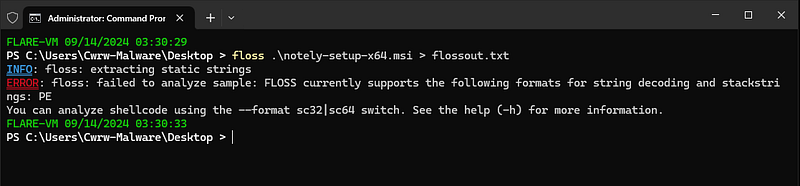
Kicking off the static analysis with FLOSS, turns out MSI isn’t compatible :p.
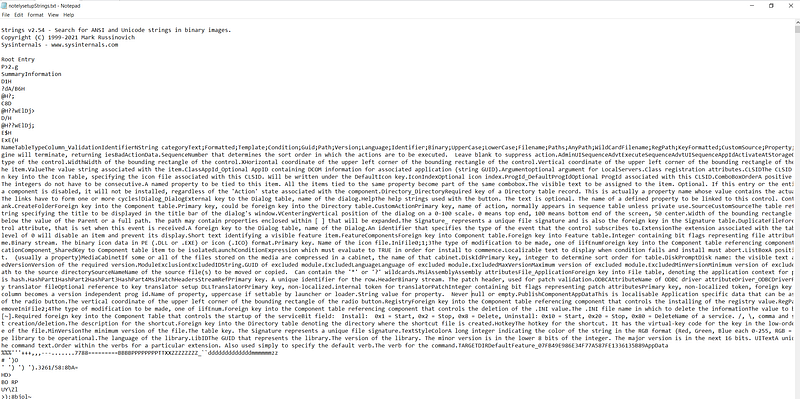
Checking with just regular strings, we can see that there is a large blob of text near the top of the collection.
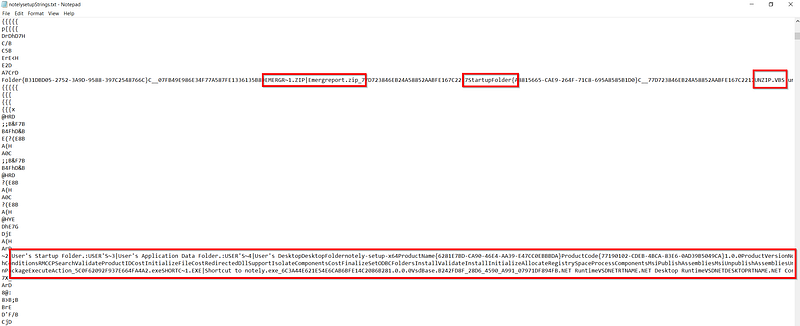
Just below this blob we can see some really useful strings, including some potential file names and target directories:
emergereport.zip
unzip.vbs
notely.exe
User’s startup folder
User’s Desktop
Then moving on to the WitchABy.dll file, FLOSS analysis did not show any significant strings within the binary. There were references to Nim libraries but nothing that suggested additional capabilities. The only string of note I found was `xorByteSeq__nim95dll_14` which could be reference to some data encoding.
Next I used CAPA to highlight key capabilities within the WitchABy.dll file. There was no mention of the XOR string identified during the string analysis; however, we do see that this sample has matched with several MBC behavior tags. These tags suggests that this process has the ability to write files, allocate RWX memory as well as termination of processes.
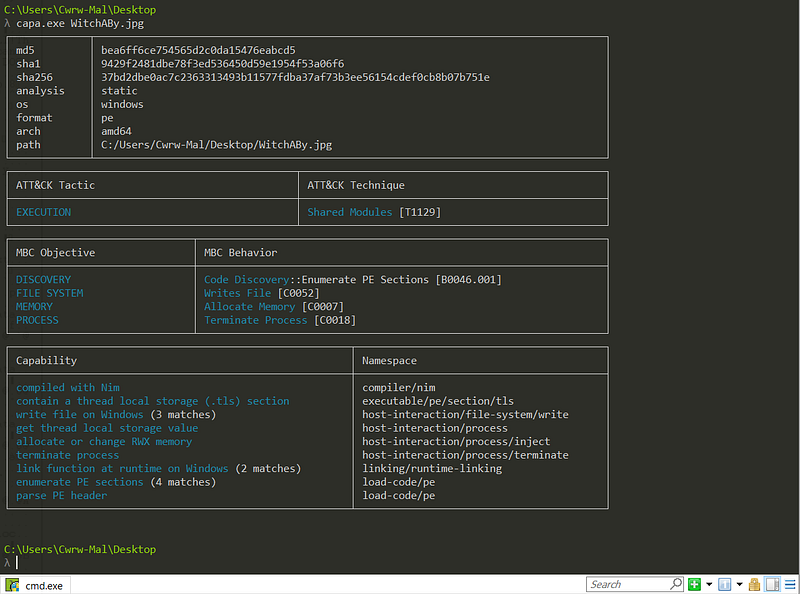
Reviewing the additional binary dropped by the MSI Bundle, notely.exe also revealed a similar output to the DLL. There are some key notes to be made here. This binary was also compiled with Nim, which suggests that this binary is also not the legitimate notely application. Additionally, there are references to hashing functionality as well as similar memory, process and file capabilities as the DLL.

Pivoting to OSINT to see if these files have been flagged before, starting with WitchABy.DLL — VirusTotal — File — 37bd2dbe0ac7c2363313493b11577fdba37af73b3ee56154cdef0cb8b07b751e, outside of the 47 hits, we alsp see that Florian Roth (YARA GOAT) over at Nextron Systems have actually flagged WitchABy.dll as a NIM stager as well as potential shell-code loader with their THOR APT Scanner.

Moving on to Notely-setup-x64.msi— VirusTotal — File — 1866b0e00325ee8907052386a9286e6ed81695a2eb35d5be318d71d91fbce2db, we also see a pretty high number of detections in VT and we see THOR is also kicking up a fuss about this sample. This time we’re seeing flags on rules for suspicious Nim binary, Zip and Lnk file as well as Lnks in relation to Phishing campaigns.

Finally, taking a look at Notely.exe — VirusTotal — File — 1e4e1ea2c70ee5634447cf20fdc35a90c7c6d82b5a43f91e613101a05fcbeba7 and Thor is 3/3. This time flagging on suspicious Nim binaries, Shellcode loader as well as Nim loader.

This has given us a strong understanding of the infection chain already. Let’s dive into some MSI-specific analysis :).
For the actual analysis of the MSI file itself I began with research on how to dissect MSI files. This resulted in finding the following blog from Dieder Stephens on MSI files — Analyzing MSI files — SANS Internet Storm Center. This showed how to review use the GNU package msitools, including msidump and msiextract as well as how to do it with Oletools MSI plugin.
I started the analysis with the following command, which dumped the tables and streams from the MSI file into a directory titled ‘notely-dump’.
msidump -t -s -d notely-dump notely-setup-x64.msi
The following screenshot showed the dumped contents:

I didn’t really have an idea what to do with this data, so I started looking for other tools to extract the files. This led me to msiextract, which is another tool under the msitools package.
The output of msiextract (below) confirmed some of the key infromation we found as part of the strings analysis. We confirmed the target file names as well as the potential target directories. This step is what allowed me to conduct analysis on the notely binary itself, discussed previously.

I also came across a cool called MSI-Dump as part of my research. This version of MSI-Dump is actually pretty cool, it has the ability to identify other suspicious MSI-related artifacts such as VBS running in memory and suspicious ‘CustomActions’. It also parses tables and streams within the MSI really nicely, as shown below.

Using MSI-Dump’s extract all function allowed me to correlate the information from all the tables in a nicely formatted text file. This allowed me to confirm again the target files and their respective location that MSI would be dropping them.

After I had extracted and assessed the binaries within this package, there was two items to review, the vbs script and the zip archive. Starting with the archive file, I unzipped it and found that it contained a sinlge LNK file. I moved the LNK over to my Windows machine for analysis with Eric Zimmerman’s LECmd. This LNK file initiating a download from consumerfinancereport[.]local/blog/index/witchABy.jpg, and then the execution of this file with regsvr32.exe. This LNK is likely where the DLL sample in the initial report came from, indicating that the victim had followed through the full execution chain.

Now onto the VBS script, this is nice and easy — just catting it out from the exported MSI resources. Reviewing this script shows that it extracts the Emergreport.zip archive from the %APPDATA% directory and executes the LNK file with ‘objWShell’. One other significant note it that this VBS would have been dropped to the User’s Startup Folder, which indicates an attempt to establish persistence.

Dynamic analysis: Part 1 (Failure)
After my static analysis of the MSI file I wanted to confirm my findings and get an idea of what the WithABy.dll capabilities were. A this point in my analysis, the below graph is a summary of the infection chain that I was aware of:

Detonating the MSI, I was able to confirm the dropped files and their respective locations. As shown below.


Then moving onto the detonation of the DLL, using ProcMon and Wireshark I was able to export the telemetry from the detonation into ProcDot for quick and easy analysis. My analysis here did not identify any additional information for my investigation. I was unable to identify any network related telemetry that was tied to the execution. I was only able to identify the spawning and termination of CMD.exe.
I also believed that the CMD process was only used to terminate the regsvr32 and was a symtom of the WERFault that spawned. This assumption was incorrect and I discuss the true purpose later in this report.

Following the same process for the notely executable, yielded a similar conclusion with even fewer identified artifacts. I assumed that this binary was only used to provide the victim some validation as to why their app isn’t working.


Code analysis — I understand it now:
Based on the infection chain of this malware with the establishment of persistence for the WitchABy DLL, I started working under the assumption that this DLL was the final-stage payload. Coupling this assumption with the CAPA and OSINT findings to guide my analysis, I opened the DLL in Ghidra to begin an analysis of the static code.
Considering this sample is a DLL, I started by taking a look at the exports and sure enough the main (;)) one here is Dllmain and NimMain. Nimmain isn’t much use here and is a Nim runtime resource rather than a payload crafted by the adversary.
Exports:

DLL code graph:

DLLMain however does have some juicy looking code in the decompiler. During my analysis, I identified a toolset built-out by ‘WeLive Security’ called Nimlift. I was able to use this script in Ghidra to help clarify some of the longer function names that trace back to built-in Nim functionality. This clearly shows that there is some XOR operations present within the file, but not much at all that suggests additional capabilities.
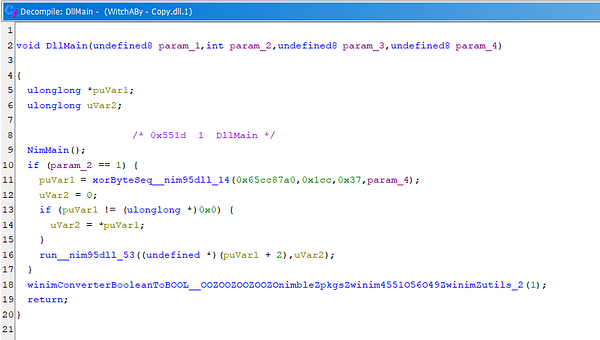
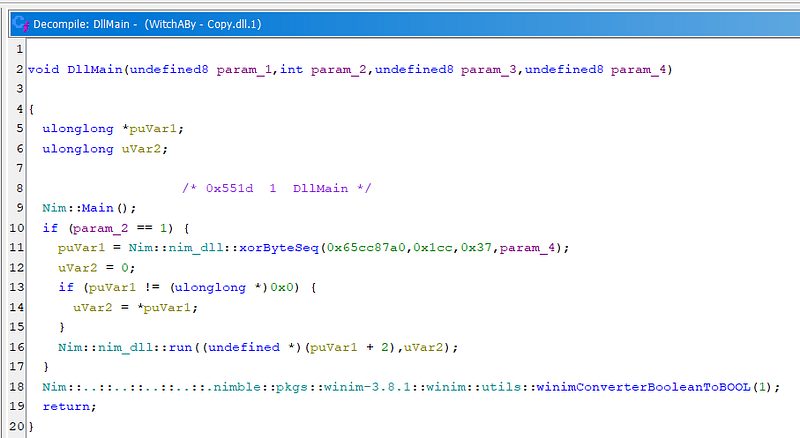
Code analysis of DllMain pre (top) and post (bottom) Nim script.
Reviewing the above decompiled code, my attention was drawn to the xorByteSeq function. I was able to find the following:
0x65cc87a0: A pointer to a section of memory in the .data section.
0x1cc: Translates to 460, in this context its likely the length of the payload in bytes.
0x37: We’re looking at XOR, so this is most likely the encryption key.
param4: No idea lmao.
Based on the above, there is likey an XORd encrypted shellcode stored in the .data section of the DLL. The first step is to collect the payload, so taking the starting address I calculated the end address with the Windows programmer calculator.

Now I have the start and end address — I moved to the address in Ghidra and copied the bytes out:

Taking the bytes, I used CyberChef to XOR with the provided key:

I then saved this output as a bin file and started my analysis. I initially tried to use scdbg.exe for the shellcode analysis but it wasn’t working very well. Instead, I loaded the shellcode in Cutter, where I was able to view the two shellcode functions.
The first was pretty much empty, but the second function ‘fcn_000000ca’ had some pretty significant code present. There were two initial comments present in the assembly breakdown, one stated ‘cmd’ and the other stated ‘ws_32’ — this led me to beieve I was on the right track and likely onto something pretty cool.
After some research into the various hex values being passed to the registers, I came across a technique called API hashing. API hashing aids in evading detection and is a technique commonly found within CobaltStrike/MSFConsole shellcode samples and works to remove signatured strings from the sample.
Hackers No Hashing: Randomizing API Hashes to Evade Cobalt Strike Shellcode Detection | Huntress
How to Use Ghidra to Analyse Shellcode and Extract Cobalt Strike Command & Control Servers
Going through the process of deobfuscating this shellcode, adding comments and googling API hashes and memory structures; I was able to identify that it has networking capabilities and the end-goal is to establish a reverse shell call-back to a C2 IP and Port. My breakdown and comments can be found in the comments of the code screenshot below.


Shellcode graph (top) decompiled code (bottom) — both containing my comments:
With the functionality of this DLL now known, its significance in the attack chain starts to make a lot more sense. The effort to establish persistent execution of this DLL file as well as the effort to disguise the file as an image, all works to ensure that this file is not removed. It proves an attacker with a HTTPs persistent reverse shell on the host.
Dynamic analysis: Part 2 (Redemtion)

I nearly wrapped this analysis up after I didn’t find anything in the dynamic analysis. There was just something that didn’t add-up around the XOR funciton in the DLL that I wanted to get an answer for. But after digging into the code analysis, I was ready to retry my dynamic analysis to validate the findings and… we get the shell :p

We got the revshell callback!
Rules, signatures and indicators:
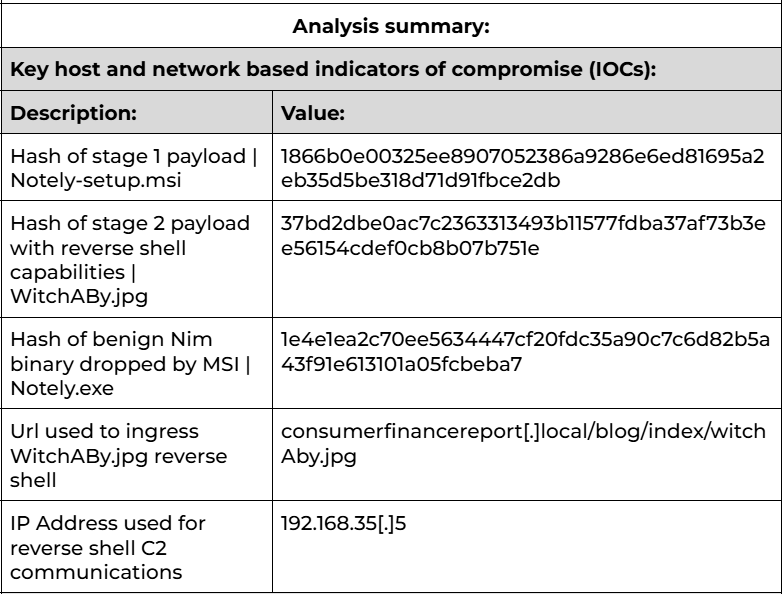
Yara_Nim_ShellCode_Likely:
import "pe"

rule Nim_ShellCode_Likely {
meta:
description = "Detects 64-bit Nim binaries with likely injection capabilities."
author = "Cwrw"

strings:
// Looking for Nim binary and MZ.
$code = "NimMain" nocase
$mz = { 4D 5A }
// XOR Custom Nim function string
$XOR = /nim95dll.+xor/ nocase

condition:
( \(mz at 0 and (pe.imports("kernel32.dll","VirtualAlloc") or pe.imports("kernelbase.dll","VirtualAlloc")) and \)code ) and ( $XOR )

}
I was playing around with trying to alert on shellcode functionality but just couldn’t figure it out — if you’re reading this and you have any suggestions, please drop it in the comments :)


